
Table of Contents
Most people who want to sell digital products start in the wrong place. They open a list of “50 digital product ideas,” pick whichever one sounds easiest, spend a weekend building it — and then wonder why nobody buys it.
The problem usually isn’t the product itself. It’s the order of operations. Choosing digital product ideas without a framework for matching them to your skills, your audience, and actual demand is why so many first products go nowhere.
This guide takes a different approach. Instead of handing you a random list, it walks through the main categories of digital products worth considering, a simple framework for narrowing them down to the right one for you, and practical ways to validate an idea before you invest real time building it.
If you’re mainly interested in which products tend to earn the most, our most profitable digital products guide covers that comparison in depth. This article focuses on something that has to happen first: figuring out what to make.
What Is a Digital Product?
A digital product is something you create once and sell repeatedly without shipping a physical item or trading your time for each sale. A Canva template, a printable planner, an ebook, or a Notion dashboard are all digital products — the buyer downloads or accesses a file, and you don’t have to remake it for every customer.
This is different from:
- A physical product, which involves materials, inventory, and shipping.
- A digital service, like Pinterest management or web design, where you’re trading hours or expertise for payment on an ongoing basis.
Digital products sit in between passive and active income. They’re not entirely hands-off — you still need to market, update, and support them — but they don’t require you to redo the work for every sale, which is what makes them appealing to bloggers, Etsy sellers, coaches, and creators trying to build something beyond one-to-one client work.
Digital Product Idea Categories
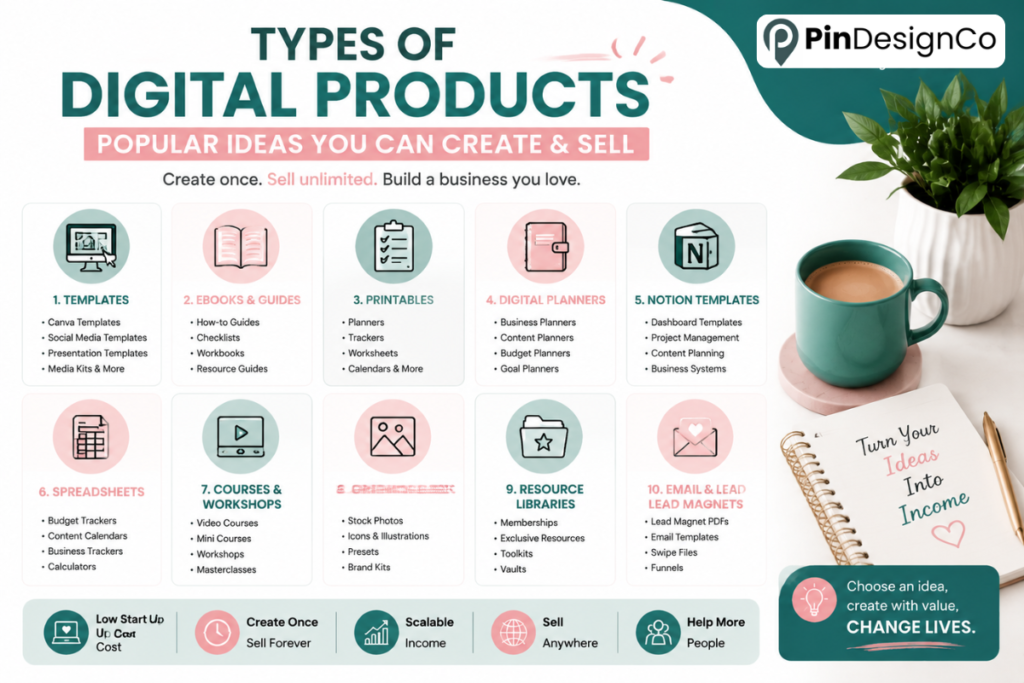
Rather than one long, undifferentiated list, it helps to think in categories. Each one suits a different skill set and audience.
Canva Templates
Canva templates are one of the more accessible entry points because they don’t require design software beyond Canva itself.
- Pinterest pin templates
- Social media post templates
- Presentation templates
- Media kit templates
- Business card and branding templates
- Lead magnet templates (opt-in freebies, checklists)
- Ebook cover and layout templates
If you already design your own graphics for a blog or business, templating that process is often the fastest path to a first product.
Ebooks & Guides
Ebooks work well when you have depth of knowledge on a specific problem, not just general familiarity with a topic.
- Beginner guides for a specific skill
- Industry- or niche-specific guides
- Reference guides and checklists in PDF form
- Short-form educational workbooks
The mistake here is writing a broad ebook (“Everything About Marketing”) instead of a narrow one (“Instagram Captions for Local Bakeries”). Narrow sells better because it’s obviously relevant to the right buyer.
Printables
Printables are simple, low-friction products — often a single PDF page or a small bundle.
- Planners and organizers
- Checklists
- Worksheets
- Habit and goal trackers
- Journals
- Wall art and calendars
They’re a common first product because the barrier to creation is low, though that also means the market is crowded — differentiation matters more than volume here.
Digital Planners
Digital planners (built for apps like GoodNotes or Notability, or as fillable PDFs) have grown alongside the broader productivity and digital-journaling trend.
- Business planners
- Content planners
- Budget and finance planners
- Productivity and habit planners
These take more design and technical setup than a basic printable — hyperlinked tabs, clickable navigation — but that complexity is also part of why buyers pay more for them.
Notion Templates
Notion templates appeal to a more technical, productivity-focused buyer.
- Content and editorial planners
- Project management systems
- Business operations dashboards
- Personal organization systems (finances, goals, habits)
If you already use Notion to run your own business or content calendar, that system is often close to a sellable product with some cleanup and instructions added.
Spreadsheets & Calculators
Spreadsheets solve a specific, often unglamorous problem — which is exactly why they sell.
- Budget spreadsheets
- Content calendars
- Business or income trackers
- Pricing and profit calculators
These require comfort with formulas (Google Sheets or Excel), but once built, they need very little ongoing maintenance.
Digital Courses & Workshops
Courses make sense when a topic requires sequence and explanation, not just a template or reference document. They also require more upfront investment: filming, structuring modules, and usually more marketing to sell at a price that reflects the effort.
For beginners, a smaller product — a template, guide, or workbook — is often a better starting point. It validates that people want to learn the topic from you before you commit to building a full course around it.
Presets, Graphics & Design Assets
For anyone with a photography, illustration, or design background:
- Lightroom and Photoshop presets
- Canva design elements (graphics, icons, mockups)
- Social media graphic packs
- Icon sets and illustrations
These lean on an existing creative skill more than the other categories, and they tend to have strong repeat-buyer potential if the style is distinctive.
Memberships & Resource Libraries
Rather than a single one-time product, this is ongoing access to a growing library of resources, templates, or training for a recurring fee.
Memberships suit creators with an existing audience and the capacity to keep producing new content regularly — they’re generally not a good starting point for a first digital product, since they require sustained output to retain subscribers.
Comparison of Common Digital Product Types
Price ranges below are illustrative examples based on common market positioning, not guarantees of what any specific product will sell for.
| Digital Product | Beginner Friendly | Creation Difficulty | Typical Price Range | Best For |
|---|---|---|---|---|
| Printables (single page) | Yes | Low | $2–$8 | Anyone starting out |
| Canva templates | Yes | Low–Medium | $5–$25 | Designers, bloggers |
| Checklists / workbooks | Yes | Low | $3–$10 | Coaches, educators |
| Ebooks / guides | Yes | Medium | $9–$29 | Subject-matter experts |
| Printable planners | Yes | Medium | $5–$15 | Organized creators |
| Digital planners (GoodNotes) | Medium | Medium–High | $10–$25 | Design + tech comfort |
| Notion templates | Medium | Medium | $10–$40 | Productivity-focused creators |
| Spreadsheets / calculators | Medium | Medium | $8–$30 | Spreadsheet-comfortable creators |
| Lightroom presets | Medium | Medium | $10–$30 | Photographers |
| Social media graphic packs | Medium | Medium | $10–$35 | Designers |
| Icon / illustration sets | Medium | Medium–High | $10–$30 | Illustrators |
| Digital courses | No | High | $30–$300+ | Established audience |
| Membership libraries | No | High (ongoing) | $9–$40/month | Active, consistent creators |
Best Digital Product Ideas for Beginners
If you’re choosing a first product, weigh it against these factors rather than picking based on what looks trendy:
- Existing skills — can you make this well without a steep learning curve?
- Existing audience — do you already have people who’d plausibly buy it?
- Creation time — can you finish it in days, not months?
- Customer problem — does it solve something specific, not vague?
- Perceived value — does it look and feel worth the price?
- Ease of delivery — can it be automated (Etsy, Gumroad, Payhip) without manual work per sale?
- Ability to update — can you improve it later without rebuilding from scratch?
- Competition level — is there evidence of demand, without the market being impossibly saturated?
Weighed against these, printables, Canva templates, and short guides are usually the most realistic first products. They’re fast to create, cheap to test, and don’t require you to already have a large audience or a finished course curriculum. Digital planners, Notion templates, and preset packs are strong second-stage products once you’ve validated a first product and understand what your specific audience responds to.
How to Choose the Right Digital Product Idea
Rather than depending on lists, it helps to have a repeatable process for generating your own ideas. A simple version:
Skill → Audience → Problem → Product → Validation
- Skill — what do you already know how to do, or what do you do faster/better than most people you know?
- Audience — who has that same problem and would pay to skip the learning curve?
- Problem — what specific, narrow frustration does that audience have?
- Product — what format solves that problem with the least effort for the buyer?
- Validation — is there evidence people are already searching for or paying for something like it?
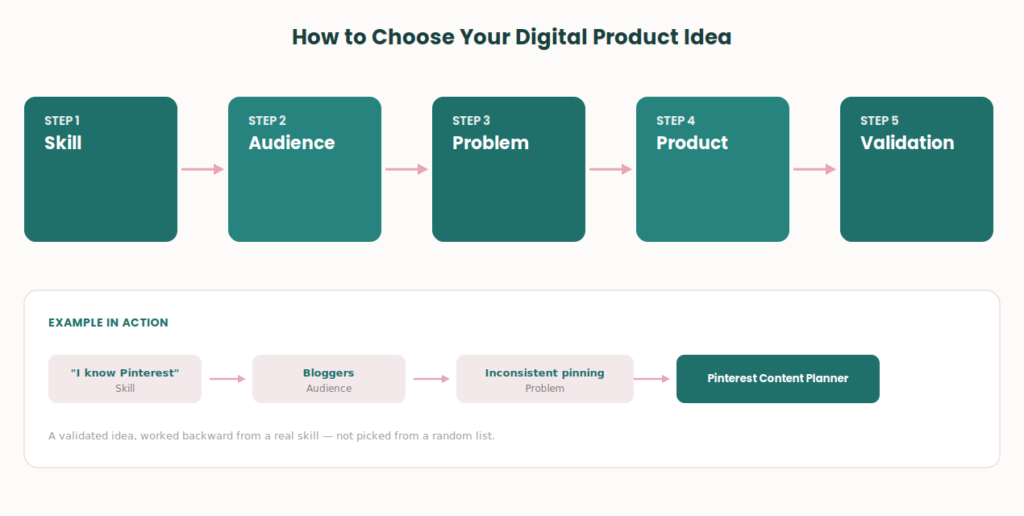
Example 1: “I know Pinterest” → audience: bloggers who struggle with consistency → problem: they don’t know what to pin and when → product: a Pinterest content planner.
Example 2: “I know Canva” → audience: small business owners without design skills → problem: they need on-brand social graphics fast → product: a Pinterest template bundle or social media template pack.
The point of this framework isn’t to land on one “correct” idea — it’s to give you a repeatable way to test multiple ideas against your actual strengths instead of guessing from a list.
How to Validate a Digital Product Idea
This step is where most first products succeed or fail — and it happens before you build anything.
- Google search behavior — search your idea and see what already ranks. Are people actively searching for it, or are you assuming demand that doesn’t show up in search volume?
- Pinterest search suggestions — type your topic into Pinterest search and see what autocomplete suggests. This reflects what people are actively looking for on the platform.
- Etsy search results — search Etsy for similar products. Existing listings with reviews are a signal of demand, not necessarily a reason to avoid the niche.
- Competitor research — look at what similar products include, how they’re priced, and what reviews say people wish they had.
- Community discussions — relevant subreddits, Facebook groups, or forums often reveal the exact language people use to describe their problem, which is useful for both validation and copywriting later.
- Existing customer questions — if you already have an audience, look at what they ask you repeatedly. Recurring questions are often disguised product ideas.
- Social media comments — comments and DMs on your own content often surface unmet needs directly.
- Keyword research — tools that show search volume and related terms can confirm whether a topic has consistent interest over time.
An important distinction: competition is evidence of demand, not automatically a bad sign. A crowded Etsy category means people are buying, not that you shouldn’t enter it. The goal of validation isn’t to find an idea with zero competitors — it’s to find a specific angle where you can be clearly different, whether that’s your design style, your niche focus, or the exact problem you solve.
Validation is not the same as copying. Looking at what already sells is about understanding demand, not repackaging someone else’s product with your own colors.
Digital Product Ideas by Audience
Different audiences tend to gravitate toward different product types based on what they already do:
Bloggers Content planners, printable resource libraries, Pinterest template packs, opt-in lead magnets, niche-specific ebooks.
Etsy Sellers Printables, digital planners, SVG/design bundles, seasonal templates, listing photo templates.
Canva Creators Canva template bundles, social media kits, presentation templates, editable branding packs.
Coaches Workbooks, checklists, client onboarding templates, goal-setting planners, mini-course workbooks.
Freelancers Client proposal templates, invoice templates, project trackers, portfolio templates, contract templates.
Content Creators Content calendars, caption template packs, Notion content systems, brand kit templates.
Small Businesses Social media template packs, marketing planners, budget and pricing calculators, onboarding document templates.
Where to Sell Digital Products
The right platform depends on your audience, product type, fee tolerance, and how much control you want over branding and marketing.
- Etsy — built-in search traffic, ideal for printables, planners, and templates; less control over branding and higher marketplace competition.
- Payhip — simple setup, low fees, works well for creators sending their own traffic (e.g., from Pinterest or a blog).
- Gumroad — straightforward for creators, digital downloads, and small course-style products.
- Shopify — more setup involved, but suited to sellers who want a fully branded store and plan to sell multiple product lines.
- WooCommerce — good if you already run a WordPress site and want to keep everything on your own domain.
- Creative Market — best for design-focused assets like templates, graphics, and fonts, aimed at a design-savvy buyer base.
There’s no universal “best” platform — a printable seller relying on Etsy search traffic has very different needs than a coach selling templates to an existing email list. For a deeper platform-by-platform breakdown, see our guide to the best platforms for selling digital products.
How Pinterest Can Help Sell Digital Products
Pinterest is a discovery and search platform, which makes it particularly well-suited to digital products — people use it to actively look for templates, planners, and ideas, not just to browse passively.
A basic funnel looks like this:
- Keyword-focused pins point to blog content or product listings, using Pinterest SEO principles so the right audience finds them through search rather than relying on virality.
- Blog content (like this article) builds topical authority and gives you a place to link both to your products and to a lead magnet.
- Lead magnets — a free template, checklist, or guide — capture emails from people who aren’t ready to buy yet.
- Email marketing nurtures that list and introduces paid products over time.
- Product-focused pins link directly to your Etsy listing or storefront for people who are ready to buy.
This is also where consistent Pinterest board strategy and pin design matter — a single well-optimized pin can continue driving traffic to a product listing for months, which is part of why Pinterest works differently than platforms built around short content lifespans.
Pinterest isn’t a replacement for validating your product idea first, but it’s one of the more efficient ways to get sustained, search-driven traffic to a product once you’ve built it.
Common Mistakes When Choosing a Digital Product
- Creating a product nobody actually searched for. Interest in a topic isn’t the same as demand for a paid product about it.
- Copying competitors directly instead of using their products as a demand signal.
- Making the product too broad, trying to serve everyone instead of a specific buyer.
- Launching too many products at once, which splits your marketing effort and makes it hard to tell what’s actually working.
- Ignoring presentation — mockups, previews, and listing photos affect conversion as much as the product itself.
- Underestimating support — even simple products generate customer questions; factor that time in.
- Choosing a selling platform before validating the idea, which can lock you into fees or setup that don’t fit the product once you understand demand.
- Focusing only on creation and skipping marketing — a finished product with no distribution plan won’t sell itself.
- Assuming passive income without ongoing effort — most digital products still need updates, marketing, and customer support over time.
Frequently Asked Questions
What are the best digital product ideas for beginners? Printables, Canva templates, and short guides tend to work best for beginners because they’re fast to create, inexpensive to test, and don’t require a large existing audience.
What digital products can I create with Canva? Canva supports templates for Pinterest pins, social media posts, presentations, media kits, ebook layouts, and printable planners — most template-based products can be built entirely inside Canva.
What digital products sell well? Products that solve a specific, recurring problem for a defined audience tend to perform best — general appeal is usually a weaker signal than a narrow, well-validated niche.
What is the easiest digital product to make? Single-page printables and checklists typically have the lowest barrier to entry, requiring minimal design or technical skill to produce.
Can I sell digital products without a website? Yes — platforms like Etsy, Gumroad, and Payhip allow you to sell directly without building your own site, though a website can help with long-term branding and SEO.
Where can I sell digital products? Common options include Etsy, Payhip, Gumroad, Shopify, WooCommerce, and Creative Market, each suited to different product types and audience sizes.
How do I know if a digital product idea will sell? Validate it first through Google and Pinterest search behavior, Etsy listings in the same category, and direct questions or comments from your existing audience, before investing significant time in creation.
Can Pinterest help sell digital products? Yes — Pinterest functions as a search-driven discovery platform, making it effective for driving consistent traffic to product listings, blog content, and lead magnets over time.
Key Takeaways
- Digital products work best when they solve a specific problem for a defined audience, not when they’re chosen from a generic list.
- Match product ideas to your existing skills and audience using the Skill → Audience → Problem → Product → Validation framework.
- Printables, Canva templates, and short guides are realistic starting points; courses and memberships are usually better as second-stage products.
- Validate demand through search behavior, Etsy listings, and community discussions before building.
- Competition is a demand signal, not a reason to avoid a niche — differentiation matters more than avoiding crowded categories.
- Pinterest works well as the discovery and traffic layer once a product idea has been validated and built.
Ready to Turn Your Product Ideas Into Traffic?
Choosing the right digital product idea is only half the equation — getting it in front of the right audience is what actually drives sales. If you’ve got a product (or a growing list of ideas) and want help turning Pinterest into a consistent traffic and sales channel, our Pinterest Management and Pinterest SEO services are built to do exactly that. You can also grab our free Pinterest marketing guide to start applying these strategies today.

Pingback: 25 Best Side Hustles for Women to Make Extra Money