Creating and publishing Pins is only half the job. The other half is knowing whether any of it is actually working, and that’s exactly what Pinterest Analytics is for.
A lot of Pinterest accounts publish consistently for months without ever opening their analytics dashboard, which means they keep repeating whatever they did first, whether it’s working or not. This guide breaks down what Pinterest Analytics actually shows you, which metrics matter for which goals, and how to turn that data into decisions instead of just numbers on a screen.
What Is Pinterest Analytics?
Pinterest Analytics is the built-in reporting dashboard available to Pinterest business accounts. It shows how your Pins, boards, and overall profile are performing, including impressions, saves, clicks, and audience details, over a timeframe you choose.
It’s free to access for any converted business account, and it pulls data directly from Pinterest’s own platform, which makes it more accurate for Pinterest-specific metrics than trying to infer performance from Google Analytics alone.
Two things it’s useful for:
- Understanding what’s resonating: which topics, formats, and boards get the most engagement
- Connecting Pinterest activity to real outcomes: website visits, sign-ups, and sales, when tracking is set up correctly
It’s worth noting Pinterest Analytics is different from a Pinterest content strategy or Pinterest SEO. Analytics doesn’t create content or make it discoverable. It tells you how the content you’ve already published and optimized is actually doing.
Why Pinterest Analytics Matters
Without analytics, you’re publishing based on guesses. With it, you can:
- See which topics consistently earn saves and clicks
- Identify which boards drive the most traffic
- Catch underperforming Pins before you repeat the same mistake
- Understand who your audience actually is, not who you assume they are
- Prove (or disprove) whether Pinterest is contributing to business goals like traffic or sales
- Make informed decisions about what to create next
None of this replaces good content or solid SEO. But it’s the feedback loop that tells you whether your content and SEO decisions are actually paying off.
Where to Find Pinterest Analytics
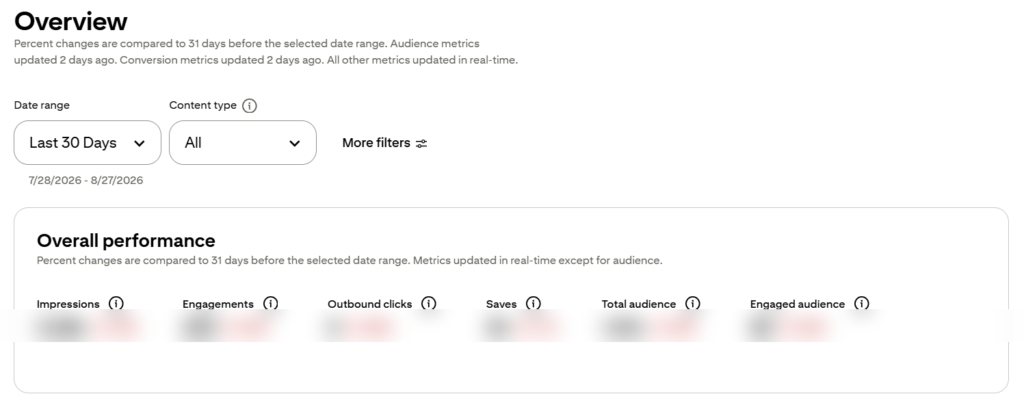
Pinterest Analytics is available directly inside a converted Pinterest Business account. From your profile, the Analytics tab gives you access to:
- Overview: a snapshot of account-wide performance
- Pinterest Trends: rising and seasonal search topics (a separate but related tool)
- Audience Insights: demographic and interest data about who engages with your content
- Conversions: outcomes like website visits and sign-ups, when the Pinterest tag is installed
If you haven’t set up a Pinterest business account yet, that’s the first step before any of this data becomes available.
Key Pinterest Analytics Metrics Explained
Not every metric matters equally, and treating them all the same is one of the most common analytics mistakes. Here’s what each one actually tells you.
Impressions
How many times your Pin appeared on someone’s screen. High impressions mean Pinterest is showing your content, but impressions alone don’t tell you whether anyone cared enough to act on it.
Saves
How many people saved your Pin to one of their own boards. Saves are one of the strongest signals of genuine interest. A saved Pin can keep resurfacing in Pinterest search long after you published it.
Pin Clicks
How many people clicked on the Pin itself to view it larger, without necessarily leaving Pinterest. This shows the Pin caught attention, but doesn’t confirm it drove traffic anywhere.
Outbound Clicks
How many people clicked through to your actual website or landing page. For most businesses, this is the metric that matters most, since it’s the closest link between Pinterest activity and real traffic.
Engagement Rate
A combined measure of saves, clicks, and other interactions relative to impressions. Useful for comparing Pins against each other rather than looking at any single number in isolation.
Audience Insights
Demographic and interest data about the people engaging with your content, including age ranges, locations, and related interests. Useful for confirming (or correcting) assumptions about who’s actually finding your Pins.
Conversions
Actions taken after someone reaches your website, such as purchases or sign-ups, visible when the Pinterest tag is properly installed on your site. This is the metric that ties Pinterest activity back to business results, not just Pinterest activity for its own sake.
Comparing Pinterest Analytics Metrics by Goal
| Goal | Metric to Prioritize | Why |
|---|---|---|
| Brand awareness | Impressions, saves | Shows reach and content resonance |
| Website traffic | Outbound clicks | Direct measure of visits driven from Pinterest |
| Email list growth | Outbound clicks, conversions | Confirms people are reaching and acting on your opt-in |
| Product sales | Conversions | Ties Pinterest directly to revenue |
| Content planning | Saves, engagement rate | Signals which topics and formats to repeat |
How to Use Pinterest Analytics to Improve Your Content
Data is only useful if it changes what you do next. Here’s a practical way to work through it.
1. Identify Your Top-Performing Pins
Sort by saves and outbound clicks over the past 30 or 90 days. Look for patterns: are certain topics, headlines, or design styles showing up repeatedly at the top?
2. Identify Underperforming Content
Just as important as knowing what’s working is knowing what isn’t. A Pin with high impressions but almost no saves or clicks usually points to a design or headline problem, not a topic problem. The Pin got shown but didn’t earn the click.
3. Review Board Performance
Some boards will consistently outperform others. This can inform which boards deserve more frequent Pins and which topics might need a dedicated board of their own.
4. Connect Analytics Back to Your Content Strategy
This is the step most accounts skip. Once you know what’s working, feed it back into your planning, prioritizing similar topics, formats, and keywords rather than treating each new Pin as a fresh guess. This is exactly the loop we cover in our Pinterest content strategy guide: publish, measure, learn, and improve.
5. Check Alignment With Your Keywords
If a Pin targeting a specific keyword isn’t getting impressions, that’s often a signal the keyword targeting or Pin description needs work, not necessarily the content itself. Cross-reference against your Pinterest keyword research to confirm you’re still targeting terms with real search volume.
Common Pinterest Analytics Mistakes
| Mistake | Why It’s a Problem | How to Fix It |
|---|---|---|
| Only checking impressions | Doesn’t reflect real business outcomes | Prioritize saves, clicks, and conversions based on your goal |
| Never installing the Pinterest tag | Conversions can’t be tracked at all | Set up the tag before evaluating sales or sign-up impact |
| Judging performance too early | New Pins take time to gain traction | Give Pins several weeks before drawing conclusions |
| Ignoring board-level data | Misses which boards are actually working | Review board performance, not just individual Pins |
| Not connecting data to content planning | Repeats the same mistakes indefinitely | Feed top-performing topics back into your content calendar |
| Comparing accounts of different sizes | Skews expectations unfairly | Track your own account’s trend over time instead |
Pinterest Analytics vs. Pinterest SEO vs. Pinterest Content Strategy
| Pinterest Analytics | Pinterest SEO | Pinterest Content Strategy | |
|---|---|---|---|
| Focus | Measuring performance | Making content discoverable | Deciding what to create |
| Answers | “What’s working?” | “Can Pinterest find this?” | “What should we create next?” |
| When it’s used | After publishing | While creating and optimizing | Before creating |
These three work as a cycle rather than separate, unrelated tasks. Strategy determines what gets made, SEO helps Pinterest surface it, and analytics tells you whether the combination is working, and that feedback reshapes the next round of strategy.
How Often Should You Check Pinterest Analytics?
A quick weekly glance is enough to catch anything unusual, but the more useful review happens monthly, when you have enough data to spot real patterns rather than short-term noise. Checking daily rarely reveals anything new and can lead to reacting to normal fluctuations rather than genuine trends.
Frequently Asked Questions
What is Pinterest Analytics used for?
It’s used to track how your Pins, boards, and profile are performing, including impressions, saves, clicks, audience data, and conversions, so you can see what’s working and adjust your content accordingly.
Is Pinterest Analytics free?
Yes. Pinterest Analytics is included at no cost with any converted Pinterest business account.
What is the most important Pinterest Analytics metric?
It depends on your goal. For website traffic, outbound clicks matter most. For sales, conversions matter most. For general content resonance, saves are the strongest signal.
How do I track website traffic from Pinterest?
Install the Pinterest tag on your website, then check the Conversions section in Pinterest Analytics to see outbound clicks and any tracked actions.
How long should I wait before judging a Pin’s performance?
Give a Pin at least a few weeks. Pinterest content often builds momentum gradually rather than performing immediately after publishing.
Why does a Pin have high impressions but low clicks?
This usually points to the Pin’s design or headline not being compelling enough to earn a click, even though Pinterest is showing it to the right audience.
How does Pinterest Analytics relate to Pinterest SEO?
SEO decisions, like keywords, titles, and descriptions, directly influence how much visibility a Pin gets. Analytics shows you the result of those SEO decisions, which helps you refine future optimization.
Key Takeaways
- Pinterest Analytics is a free, built-in dashboard for measuring how your content performs
- Impressions show reach, but saves, clicks, and conversions show real interest and outcomes
- Match the metric you prioritize to your actual goal, not to whichever number looks biggest
- The real value comes from feeding what you learn back into your content strategy and SEO decisions
- Review monthly for real patterns, and give new Pins time before judging performance
Final Thoughts
Pinterest Analytics won’t create better content on its own, but it removes the guesswork. Once you know which topics, formats, and boards are actually earning saves and clicks, planning your next batch of Pins gets a lot easier.
A simple place to start: pull up your top five Pins from the last 30 days, note what they have in common, and build your next few Pins around that pattern. That one habit does more for long-term performance than any single metric on its own.
If you’d rather have someone review your numbers and adjust your strategy for you, that kind of ongoing analysis is part of what our Pinterest SEO services cover.