
Pinterest is more than a place to save ideas and inspiration. For bloggers, creators, ecommerce brands, and digital product businesses, a well-optimized Pinterest Business account can help people discover your content, visit your website, save your products, and take meaningful actions.
But growing on Pinterest is not about posting as many Pins as possible or chasing a single metric. A stronger approach is to build a system around profile optimization, keyword research, useful content, fresh Pin designs, consistent publishing, Pinterest SEO, trends, and analytics.
This guide explains how to boost a Pinterest Business account with practical strategies you can apply without relying on shortcuts or arbitrary posting formulas.
1. Optimize Your Pinterest Business Profile
Before focusing on Pins, make sure your Pinterest Business profile clearly tells both Pinterest and potential visitors what your account is about.
A Pinterest Business account gives you access to tools such as Pinterest Analytics and business-focused features. Pinterest allows you to either create a new business account or convert a personal account into one.
Optimize Your Profile Name
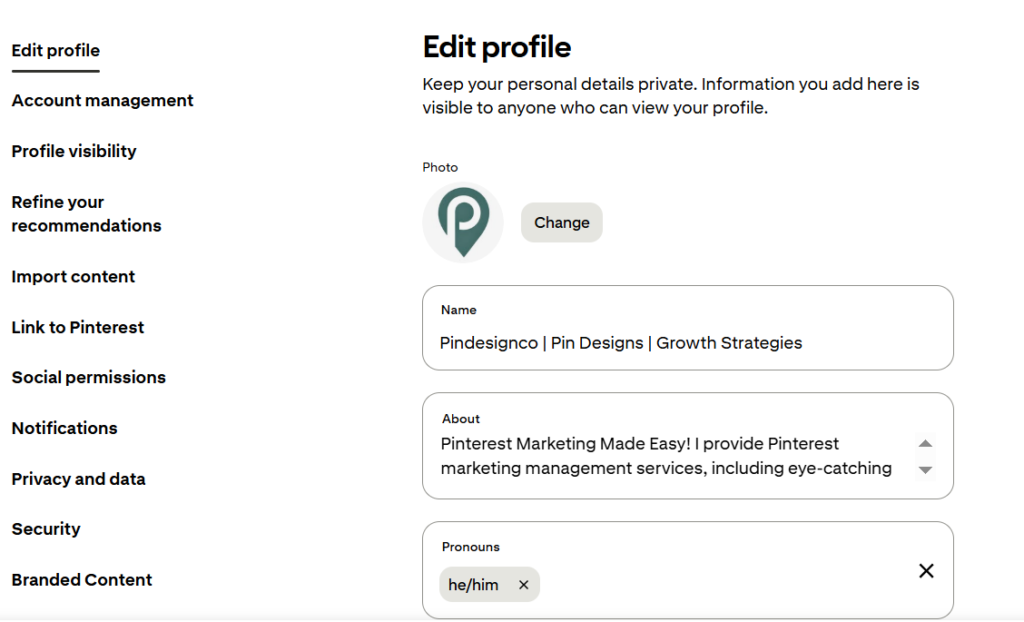
Your profile name should communicate your brand and niche clearly.
For example:
PinDesignCo | Pin Designs | Growth Strategies
is more descriptive than simply:
PinDesignCo
If appropriate, naturally include a keyword that describes your main service, topic, or audience.
Don’t turn your profile name into a list of keywords. Keep it readable and brand-focused.
Write a Clear Pinterest Bio
Your bio should answer three simple questions:
- What do you offer?
- Who do you help?
- What type of content do you publish?
For example:
Pinterest Marketing Made Easy! I provide Pinterest marketing management services, including eye-catching pin designs, account setup with logo & banner, SEO-friendly keywords, and more!
The goal is clarity, not keyword stuffing.
Claim Your Website
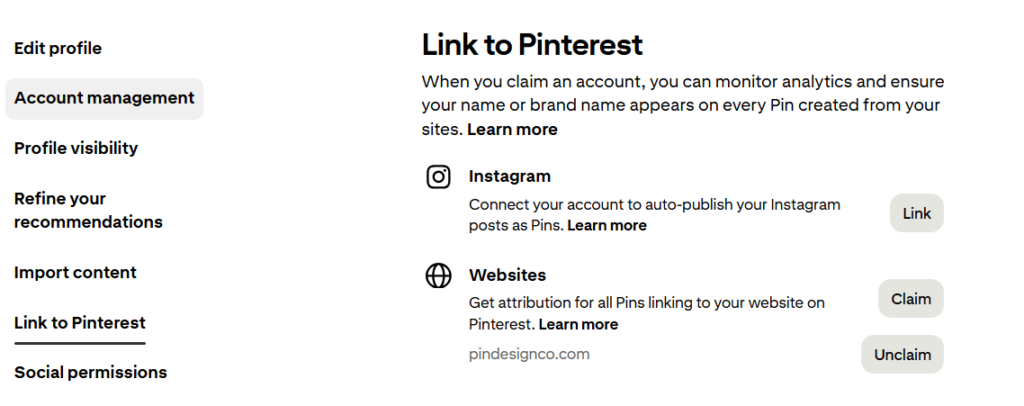
Claiming your website connects your Pinterest presence with your domain and gives you better visibility into content associated with your site.
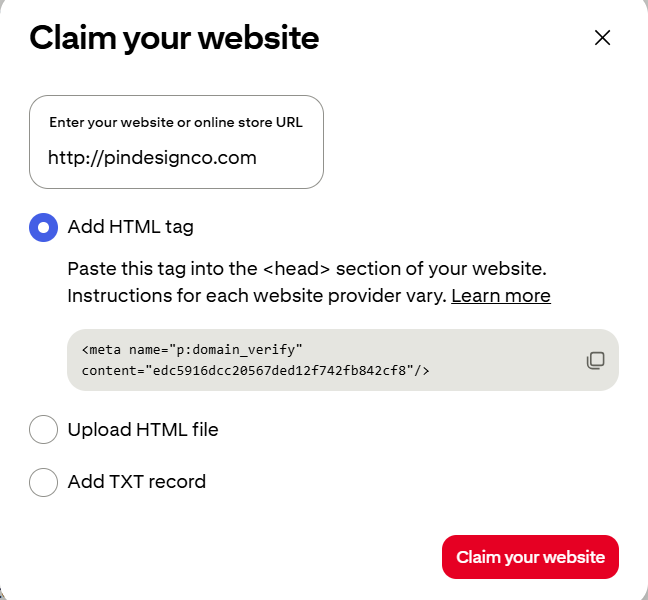
It also helps you understand how content from your claimed website is performing inside Pinterest Analytics.
If you’re building a business around Pinterest, this should be part of your basic setup.
2. Build Your Strategy Around Pinterest Keywords
Pinterest works differently from many traditional social platforms because people often use it to search for ideas, solutions, products, and inspiration.
That makes keyword research an important part of growing a Pinterest Business account.
Start with a broad topic and expand it into specific search phrases.
For example:
Broad topic:
Pinterest marketing
More specific topics:
- Pinterest SEO
- Pinterest content strategy
- Pinterest Pin design
- Pinterest marketing for beginners
- Pinterest keyword research
You can use Pinterest’s search experience to discover related phrases and use those ideas to understand what your audience is looking for.
For a more detailed process, see our Pinterest Keyword Research guide.
Pinterest Keyword Research guide
Map Keywords to Content
Don’t collect keywords without a purpose.
Instead, connect them to:
Keyword → Board → Pin → Website page
For example:
Keyword: Pinterest content strategy
Board: Pinterest Marketing Tips
Pin: Pinterest Content Strategy: Complete Guide
Destination: Your Pinterest Content Strategy article
This creates a much more organized Pinterest content system.
3. Create Fresh, High-Quality Pins
One of the biggest mistakes is thinking Pinterest growth comes from simply publishing more content.
Instead, focus on creating fresh, useful, relevant Pins that give people a reason to stop, save, or click.
Pinterest recommends creating your own fresh content and emphasizes high-quality images and videos. For image and video Pins, Pinterest recommends a 2:3 aspect ratio.
What Makes a Strong Pin?
A good Pin should have:
- A clear visual hierarchy
- A strong headline or hook
- Easy-to-read text
- High-quality imagery
- Consistent branding
- A clear connection to the destination page
- A useful reason to click or save
For example, instead of:
Pinterest Tips
try:
Pinterest SEO Best Practices
Rank Your Pins Faster
The second version communicates a specific benefit and gives the user a clearer reason to engage.
Create Different Angles
If you have one useful blog post, you don’t need to create the exact same Pin repeatedly.
Instead, create genuinely different versions.
For one article, you might create:
- A beginner-focused Pin
- A list-style Pin
- A problem/solution Pin
- A step-by-step Pin
- A mistake-focused Pin
The content destination can remain the same while the creative angle changes.
For more design guidance, see our Pinterest Pin Design guide.
4. Create a Consistent Pinterest Content System
You don’t need to publish an unrealistic number of Pins every day.
There is no universal posting number that guarantees Pinterest growth.
Instead, build a schedule you can realistically maintain while continuing to produce useful, original content.
A simple system might look like:
Monday: Create new content
Tuesday: Design fresh Pins
Wednesday: Publish/schedule Pins
Thursday: Create another content variation
Friday: Review performance
Your actual schedule can be different.
The important part is consistency and quality.
Pinterest specifically recommends creating fresh content and reviewing performance to understand what your audience is engaging with.
Use a Content Calendar
A Pinterest content calendar can help you organize:
- Blog posts
- Target keywords
- Pin titles
- Boards
- Pin designs
- Destination URLs
- Publishing dates
- Performance results
This prevents your Pinterest strategy from becoming a collection of random Pins.
For a deeper framework, read our Pinterest Content Strategy guide.
Pinterest Content Strategy guide
5. Optimize Your Pins for Pinterest SEO
Creating a beautiful Pin is only part of the process.
Pinterest needs enough context to understand what your content is about.
Use relevant keywords naturally in places such as:
- Pin title
- Pin description
- Board title
- Board description
- Website content
- Destination page
Pinterest’s own guidance recommends using relevant keywords across Pin titles, descriptions, board titles, board descriptions, and website URLs.
Example
Suppose your target keyword is:
Pinterest Content Strategy
A natural Pin title could be:
Pinterest Content Strategy: 10 Steps to Plan Better Pins
The description could naturally explain what the reader will learn.
Don’t repeat the exact keyword over and over.
Pinterest SEO should help Pinterest understand the topic while keeping the text useful for humans.
For a complete optimization framework, see:
6. Use Pinterest Trends to Find Better Content Opportunities
Pinterest Trends can help you discover search behavior and seasonal interest before deciding what to create.
Pinterest says its Trends tool provides historical views of search, save, and shopping trends across regions and countries, and can help identify seasonal changes and rising topics.
This makes it useful for planning content ahead of time.
For example, if you’re creating content around:
- Christmas
- Valentine’s Day
- Wedding planning
- Summer recipes
- Back-to-school
- Digital products
- Home organization
you don’t want to wait until the exact event arrives.
Look for relevant seasonal patterns and prepare your content in advance.
Don’t Chase Every Trend
A trend is only useful when it fits your:
Audience + niche + business goal
If a trend has nothing to do with your brand, you don’t need to create content around it.
7. Organize Your Pinterest Boards Strategically
Boards should make your content easier to understand and discover.
Instead of creating dozens of random boards, organize them around clear topics related to your niche.
For example, a Pinterest marketing brand could have:
- Pinterest SEO Tips
- Pinterest Marketing Tips
- Pinterest Pin Design
- Pinterest Content Strategy
- Canva Templates for Pinterest
- Digital Products to Sell
- Pinterest Business Tips
Your board names should be clear and descriptive.
Board descriptions can also provide additional context using relevant keywords naturally.
Keep Boards Relevant
Don’t create a board simply because a keyword exists.
Ask:
Does this board make sense for my audience and my overall content strategy?
If the answer is no, don’t create it.
For more board ideas:
8. Use Pinterest Analytics to Improve Your Strategy
Pinterest Analytics turns your Pinterest account from a guessing game into a measurable content system.
Pinterest Analytics provides performance information such as impressions, saves, Pin clicks, outbound clicks, follows, and other metrics depending on the Pin and account setup.
But don’t make the mistake of treating every metric equally.
Focus on Metrics That Match Your Goal
| Goal | Useful Metrics |
|---|---|
| Increase visibility | Impressions |
| Understand content interest | Saves |
| Measure Pin interaction | Pin clicks |
| Drive website traffic | Outbound clicks |
| Grow your audience | Follows |
| Measure business outcomes | Conversions, where tracking is available |
For example, if your primary goal is website traffic, outbound clicks are more useful than simply looking at impressions.
If your goal is content resonance, saves can help you identify topics people find worth keeping.
Pinterest also lets you review top Pins and boards and sort performance by metrics such as impressions, engagements, Pin clicks, outbound clicks, and saves.
Look for Patterns
Don’t just ask:
Which Pin got the most impressions?
Ask:
- Which topics get the most saves?
- Which Pins generate outbound clicks?
- Which designs repeatedly perform well?
- Which boards attract useful traffic?
- Which content should I create more of?
That’s where analytics becomes useful.
9. Improve Underperforming Pins Instead of Guessing
Not every Pin will perform well.
That’s normal.
If a Pin has high impressions but very few clicks, investigate the entire user journey.
Check the Pin
Is the headline clear?
Is the design easy to understand?
Does the visual communicate a benefit?
Check the Keyword
Are you targeting a relevant search phrase?
Does the Pin actually match what people searching for that topic would expect?
Check the Destination Page
Does the landing page deliver what the Pin promised?
For example, if your Pin says:
10 Pinterest SEO Tips
the destination page should actually provide those tips.
Pinterest’s own guidance recommends reviewing performance and using what you learn to create and optimize future content.
Instead of deleting everything that performs poorly, use the data to decide what to change.
10. Use Pinterest Ads Strategically
Organic Pinterest content should be the foundation of your strategy, but Pinterest Ads can be useful when you have a clear business objective.
Pinterest provides advertising options for goals such as awareness, traffic, and sales, depending on availability and campaign setup.
Before spending money, make sure you know:
- What you’re promoting
- Who you want to reach
- Where the Pin sends people
- What action you want them to take
- How you’ll measure the result
Don’t use advertising to compensate for a weak Pin or poor landing page.
A better approach is to first identify content that has demonstrated potential and then test paid distribution where it makes business sense.
How to Boost a Pinterest Business Account: The Complete Growth Loop
The strongest Pinterest accounts don’t rely on one tactic.
They use a repeatable system:
Research → Plan → Create → Optimize → Publish → Analyze → Improve
Here’s what that looks like in practice:
1. Research
Find keywords, audience interests, seasonal topics, and content opportunities.
2. Plan
Choose your content pillars, boards, topics, and publishing schedule.
3. Create
Design fresh Pins that communicate one clear idea or benefit.
4. Optimize
Use relevant keywords and make sure the Pin, board, and destination page are aligned.
5. Publish
Maintain a realistic schedule that you can sustain.
6. Analyze
Review impressions, saves, clicks, outbound clicks, and other relevant metrics.
7. Improve
Create more of what works and refine content that isn’t achieving your goal.
This turns Pinterest into a long-term content marketing system instead of a platform where you simply publish images and hope they take off.
Common Pinterest Business Account Mistakes to Avoid
If your account isn’t growing, check whether you’re making any of these mistakes.
1. Publishing Without Keyword Research
Creating content without understanding what your audience searches for makes it harder to build a focused strategy.
2. Creating Repetitive Pins
Publishing nearly identical Pins repeatedly doesn’t give your audience much new value.
Create genuinely different creative angles instead.
3. Focusing Only on Impressions
High impressions can look impressive, but they don’t automatically mean you’re getting meaningful traffic or conversions.
4. Ignoring Your Destination Page
A good Pin can’t compensate for a confusing or irrelevant landing page.
5. Changing Strategy Too Quickly
Pinterest content can continue to surface over time. Pinterest notes that high-quality, relevant Pins can continue to resurface seasonally.
Give your content enough time to generate useful data before completely changing direction.
6. Chasing Every Trend
Use trends when they support your niche and business goals.
Don’t build your entire content strategy around temporary trends.
7. Using Arbitrary Posting Rules
There is no magic number of Pins per day that guarantees success.
Build a sustainable system around your available resources and content quality.
How Long Does It Take to Boost a Pinterest Business Account?
There is no universal timeline.
Some Pins may gain attention quickly, while other content can continue gaining visibility later.
Instead of asking:
“How many days until I grow?”
ask:
“Am I consistently improving my content based on real Pinterest data?”
Track your performance over meaningful periods rather than reacting to every daily fluctuation.
Pinterest’s Analytics dashboard itself includes performance over time and notes that real-time metrics are estimates and can change.
Frequently Asked Questions
How do I boost my Pinterest Business account?
Start by optimizing your profile, researching relevant keywords, creating fresh Pins, organizing boards around clear topics, publishing consistently, using Pinterest SEO, studying Pinterest Trends, and reviewing Analytics to improve future content.
How often should I post on Pinterest?
There is no universal posting frequency that works for every account. Focus on publishing fresh, useful content on a schedule you can maintain consistently without sacrificing quality.
Does Pinterest SEO help grow a Business account?
Yes. Pinterest SEO helps the platform understand your content so it can better match Pins with relevant searches and interests. Use relevant keywords naturally in your Pin titles, descriptions, boards, and related website content.
What should I track in Pinterest Analytics?
Choose metrics based on your goal. Impressions can help measure visibility, saves can indicate content interest, outbound clicks can show website traffic, and conversions can help measure business outcomes when appropriate tracking is available.
Are Pinterest followers the most important growth metric?
Not necessarily. Followers can be useful, but your most important metric should match your business objective. For example, a website-focused business may care more about outbound clicks and conversions than follower count.
Should I use Pinterest Trends?
Yes. Pinterest Trends can help you research rising and seasonal search topics and identify opportunities for relevant content.
Should I run Pinterest Ads?
Pinterest Ads can be useful when you have a clear objective and a strong Pin and destination page. Start with a defined goal and measure the results rather than advertising simply to increase impressions.
Final Thoughts
Learning how to boost a Pinterest Business account isn’t about finding one secret trick or posting an unrealistic number of Pins every day.
It’s about building a system.
Research the topics your audience searches for. Organize those topics into a clear content strategy. Create fresh and useful Pins. Optimize them for Pinterest search. Publish consistently. Then use Analytics to understand what your audience actually responds to.
Over time, that creates a powerful feedback loop:
Better research → Better content → Better Pins → Better data → Better decisions
If you want to go deeper, explore our resources on Pinterest SEO, Pinterest Content Strategy, Pinterest Keyword Research, and Pinterest Pin Design.
And if you want help managing the entire process, PinDesignCo also offers Pinterest Management Services for businesses that want a consistent Pinterest content and growth system.

Pingback: Pinterest Affiliate Marketing Guide: Grow Traffic & Income
Pingback: Pinterest Analytics: Complete Guide to Metrics & Performance