If you’re new to Pinterest, it’s easy to assume it works like Instagram or Facebook. It doesn’t. Pinterest is a visual search engine, and once that clicks, everything else about growing on it starts to make sense.
This guide walks you through exactly how to get started with Pinterest marketing — from setting up your account correctly to designing pins that actually get clicked. No fluff, no vague “post consistently” advice without context. Just the steps that work.
Table of Contents
What Is Pinterest Marketing (And Why It’s Not Like Other Social Media)
Most social platforms are built around people you already know. Pinterest is built around what people are searching for. Users come to Pinterest to plan a wedding, find a recipe, redesign a room, or research a product — and they search for it the same way they’d search Google.
That’s why a pin you publish today can still be driving traffic a year from now. Unlike a tweet or an Instagram post that disappears from feeds within hours, a well-optimized pin has a long shelf life because it’s indexed and surfaced based on relevance, not recency.
This distinction matters because it changes your entire strategy. You’re not trying to go viral. You’re trying to get found.
Step 1: Set Up a Pinterest Business Account
If you’re using Pinterest to grow a blog, shop, or service business, a personal account won’t cut it. A business account unlocks analytics, ad tools, and rich pins — all of which you’ll need.
- Go to Pinterest and select Create a business account (or convert an existing personal one)
- Fill in your business name and choose the category that best matches what you do
- Add a clear profile photo — your logo works well here
- Write a short, keyword-rich bio describing who you help and how
Step 2: Optimize Your Profile and Claim Your Website
Before you publish a single pin, get your profile foundation right.
Claim your website. This links your domain to your Pinterest account, unlocks analytics for pins linking back to your site, and adds your profile photo to any pin pulled from your domain — which builds trust with users.
Write a keyword-focused profile description. Think about what someone would type into Pinterest search to find a business like yours, and use that language naturally in your bio.
Set up rich pins. These automatically pull metadata (like article titles or product prices) from your website, making your pins look more complete and professional.
Step 3: Do Basic Pinterest Keyword Research
This is the step most beginners skip, and it’s the one that matters most. Pinterest ranks content based on relevance to search terms, so if your boards, pin titles, and descriptions don’t include the right keywords, your content simply won’t surface.
Start typing a broad term into the Pinterest search bar and note the autofill suggestions — these are real terms people are searching for. Do the same inside Pinterest’s guided search (the keyword pills that show up when you search a term) to find related long-tail phrases.
Keep a simple running list of keywords by topic. You’ll use these across your board names, pin titles, pin descriptions, and even image alt text.
For a deeper walkthrough, see our guide to Free Pinterest Marketing Guide.
Step 4: Create Boards Strategically
Boards aren’t just folders — they’re topic categories that help Pinterest understand what your account is about.
- Create 10–15 boards centered on topics relevant to your niche
- Use clear, keyword-rich board titles (avoid cute or vague names)
- Write a 2–3 sentence board description using natural language and relevant keywords
- Order your boards with your most important, business-relevant topics first
Avoid the temptation to create a board for every possible interest. A focused, relevant set of boards builds topical authority faster than a scattered one.
Step 5: Design Pins That Get Clicks
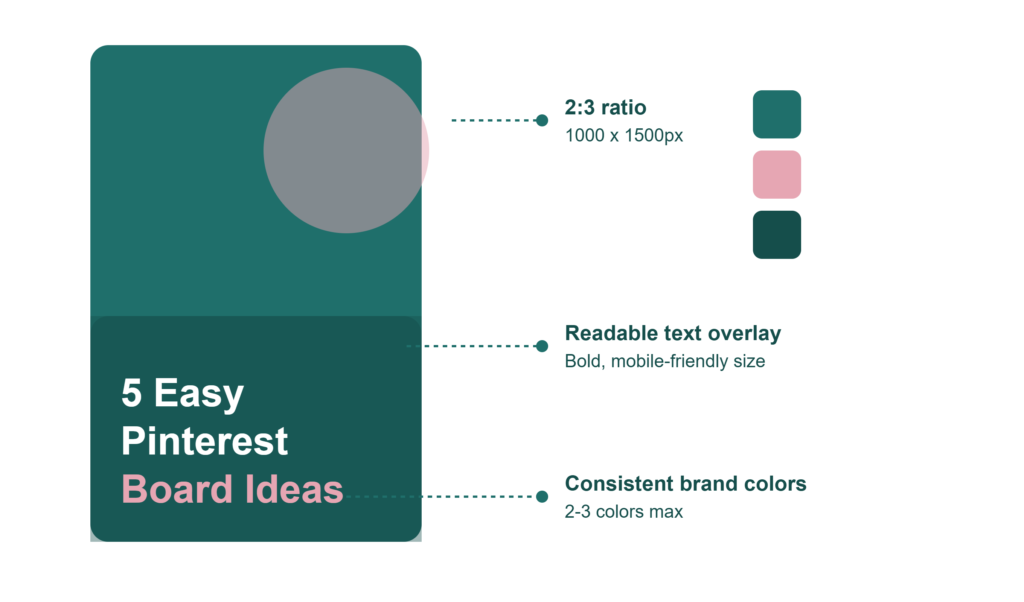
Your pin design is what stops someone mid-scroll. A few fundamentals make a measurable difference:
- Use a 2:3 aspect ratio (1000 x 1500 px is the standard)
- Add clear, readable text overlay — most users are scrolling on mobile, so small fonts get lost
- Stick to 2–3 brand colors and fonts so your pins are instantly recognizable as yours
- Show the outcome, not just the topic — a pin that says “5 Easy Pinterest Board Ideas” performs better than one that just says “Pinterest Boards”
- Design 2–3 pin variations per piece of content so you can test what resonates
If design isn’t your strength, tools like Canva make it easy to build on-brand templates you can reuse.
Related: our guide to Pinterest pin design that converts.
Step 6: Post Consistently and Track What Works
Pinterest rewards accounts that publish fresh content regularly, but consistency matters more than volume. Publishing 3–5 quality pins a week beats sporadically posting 20 in one day and going quiet for a month.
Once you’ve been active for a few weeks, start checking Pinterest Analytics to see:
- Which pins are getting the most impressions and saves
- Which boards are driving the most outbound clicks
- What search terms are bringing people to your content
Use this data to double down on what’s working instead of guessing.
Beginner Mistakes vs. What to Do Instead
| Common Mistake | Better Approach |
|---|---|
| Using a personal account for business | Switch to a Pinterest business account for analytics and ads access |
| Random board names (“My Faves”) | Clear, keyword-based board titles |
| Text-heavy, cluttered pin design | Simple design with one clear message per pin |
| Posting once and forgetting analytics | Reviewing analytics weekly to refine strategy |
| Pinning only your own content | Mixing your content with relevant pins from others (where allowed) |
| Ignoring pin descriptions | Writing full, keyword-rich descriptions for every pin |
Quick-Start Checklist
- Set up a Pinterest business account
- Claim your website
- Write a keyword-optimized bio
- Enable rich pins
- Build 10–15 focused, keyword-based boards
- Do basic keyword research for your niche
- Design on-brand, mobile-friendly pins
- Publish consistently (3–5 pins/week minimum)
- Check analytics weekly and adjust
Want the full walkthrough saved for later? Grab our Free Pinterest Guide — a complete beginner-to-growth roadmap you can work through at your own pace, delivered straight to your inbox.
Frequently Asked Questions
Is Pinterest marketing free?
Yes. Creating a business account, pinning organically, and using analytics costs nothing. Paid ads are optional and only needed if you want to accelerate reach.
How long does it take to see results on Pinterest?
Most accounts start seeing meaningful traffic within 60–90 days of consistent, keyword-optimized pinning. Because Pinterest content has a long shelf life, results tend to compound over time rather than spike and fade.
How many pins should a beginner post per day?
Quality matters more than quantity. Publishing 3–5 well-designed, keyword-optimized pins a few times a week is a solid starting pace — you can scale up once you understand what’s working.
Do I need a blog or website to use Pinterest marketing?
No. Pinterest works well for e-commerce shops, Etsy sellers, coaches, and service businesses too — you’re simply linking pins to product pages, service pages, or booking links instead of blog posts.
What’s the difference between Pinterest SEO and Pinterest ads?
Pinterest SEO is about optimizing your organic content (boards, pins, descriptions) to rank in search — it’s free but takes time. Pinterest ads are paid placements that get immediate visibility but stop working once you stop paying.
Key Takeaways
- Pinterest functions as a visual search engine, not a traditional social feed
- Keyword research is the foundation everything else builds on
- Strategic boards and well-designed pins work together to drive discoverability
- Consistency and analytics review matter more than posting volume
- Results build over time, so give your strategy at least 60–90 days before judging performance
Ready to Grow Your Pinterest Traffic Faster?
Setting up the right foundation is only the first step — growing consistently takes strategy, design, and ongoing optimization. If you’d rather hand that off to experts, PinDesignCo’s Pinterest Management and Pinterest SEO services are built to help bloggers, small businesses, and e-commerce brands turn Pinterest into a reliable traffic source, without the guesswork.