
If you’ve ever posted a beautiful Pin and watched it get almost no views, the problem usually isn’t your design. It’s that Pinterest doesn’t know what your Pin is about.
Pinterest works like a visual search engine. Before it shows your content to anyone, it needs to understand what you’re offering — and it figures that out through the words you use, not just the images you upload. That’s where Pinterest keyword research comes in.
In this guide, you’ll learn what Pinterest keyword research actually is, how it’s different from keyword research on Google, and a step-by-step process you can use for any niche — whether you’re a blogger, an Etsy seller, or selling your own digital products.
Table of Contents
What Is Pinterest Keyword Research?
Pinterest keyword research is the process of finding the words and phrases people actually type into Pinterest search, so you can use them in your profile, boards, and Pins to help Pinterest understand and recommend your content.
Unlike a social feed, Pinterest search works closer to Google. People come to Pinterest actively looking for ideas — recipes, outfits, business tips, home projects — and they type search terms to find them. Every time you optimize a Pin title, board description, or profile bio with the right keywords, you’re giving Pinterest the context it needs to match your content with the people searching for it.
Pinterest search, Pinterest keywords, and Pinterest SEO are really three parts of the same system:
- Pinterest search is how users find content.
- Pinterest keywords are the terms that connect your content to those searches.
- Pinterest SEO is the overall practice of optimizing your account and content around those keywords.
Get the keywords right, and everything else — boards, Pins, descriptions — has a much better chance of being seen by the right audience.
Why Pinterest Keyword Research Matters
Keyword research isn’t just a technical SEO task. It directly affects how much of your content Pinterest actually shows to people.
Here’s what solid keyword research can help with:
- Better discoverability. Pinterest can only recommend content it understands. Clear keywords make that possible.
- More accurate targeting. You reach people who are already interested in what you’re offering, instead of a random audience.
- Higher impressions over time. Well-optimized Pins tend to get picked up in more relevant searches and recommendations.
- Improved clicks and saves. When your Pin matches what someone searched for, they’re more likely to engage with it.
- Long-term organic growth. Pinterest content has a long shelf life. A well-keyworded Pin can keep bringing in traffic for months or years.
It’s worth being realistic here: keyword research improves your chances of visibility. It doesn’t guarantee viral Pins or a fixed amount of traffic. Pinterest’s algorithm also weighs factors like image quality, engagement, and freshness. Keywords are the foundation — not the whole strategy.
Pinterest Keywords vs. Google Keywords
If you’ve done keyword research for a blog or website before, some of that knowledge carries over to Pinterest — but not all of it. The two platforms serve different kinds of intent.
| Factor | Google Keyword Research | Pinterest Keyword Research |
|---|---|---|
| User intent | Often looking for a specific answer or website | Often browsing for ideas, inspiration, or products |
| Search behavior | Precise, often problem-solving | Broader, exploratory, visual |
| Content format | Text-first (articles, pages) | Image/video-first (Pins) |
| Seasonality | Present, but less dominant | Very strong — many searches spike weeks or months ahead of an event |
| Keyword placement | Titles, headers, body content, meta tags | Profile, boards, board descriptions, Pin titles, Pin descriptions |
| Discovery style | Search-driven | Search-driven and interest-driven (recommendations) |
The biggest mindset shift: on Pinterest, people are often searching for a feeling or an idea — “cozy fall outfit ideas,” “small business bookkeeping tips” — rather than a specific factual answer. Your keyword research needs to reflect that broader, more visual way of thinking.
How to Do Pinterest Keyword Research Step by Step
Here’s a practical process you can apply to almost any niche. We’ll use Digital Products as a running example so you can see how it works in practice.
Step 1: Start With Your Main Topic
Every keyword research process starts with a broad topic — the core subject your content or business is built around.
If you sell digital products, your main topic might simply be:
Digital Products
From here, everything else branches out. Write your main topic down, and think about the specific angle you cover: are you teaching people to create digital products, sell them, or use them? That angle shapes the keywords you’ll target next.
Step 2: Use Pinterest Search Suggestions
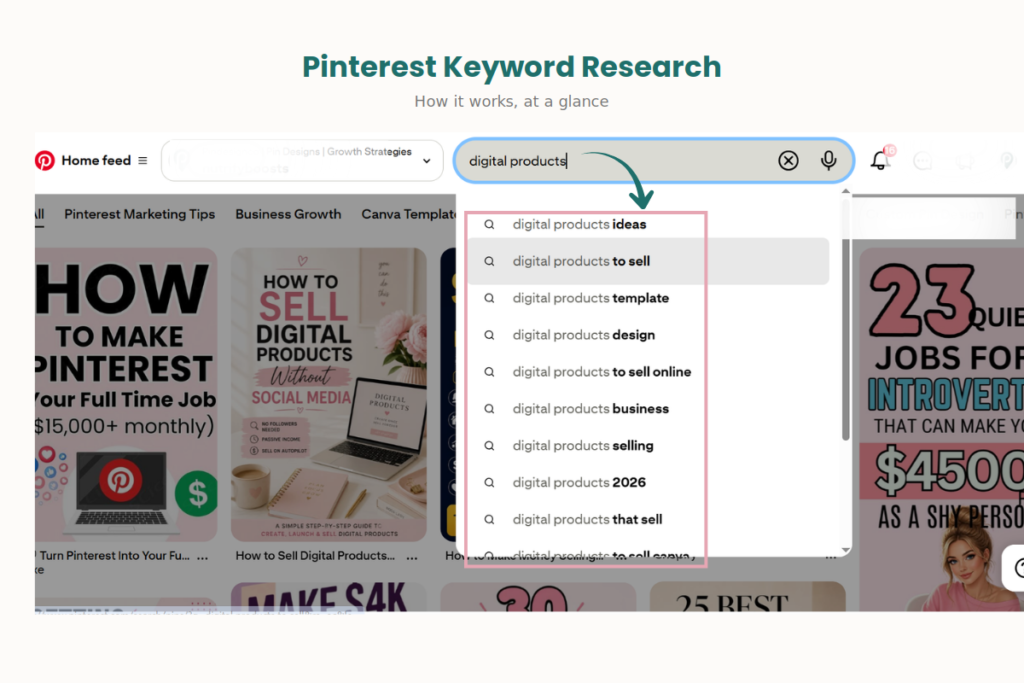
Open the Pinterest app or website and type your main topic into the search bar — but don’t hit enter yet. Pinterest’s autocomplete will show you real search suggestions based on what people are actively typing.
For “digital products,” you might see suggestions like:
- digital product ideas
- digital products to sell
- digital products template
- digital products design
- digital products to sell online
These aren’t guesses — they’re phrases Pinterest is suggesting because real users search for them. This is one of the fastest, most reliable ways to find Pinterest-specific keyword ideas.
Step 3: Explore Related Search Terms
Once you run a search, scroll down. Pinterest often shows a row of related search pills above the results — additional keyword variations connected to your original search.
For “digital products,” related terms might include:
- Canva digital products
- digital product ideas for passive income
- how to sell digital products
Click through a few of these. Each one can lead you to more specific sub-niches and keyword angles you might not have thought of on your own.
Step 4: Analyze Pinterest Search Results
Before you commit to a keyword, look at what’s already ranking for it. Search the term and study the top Pins:
- What kind of images are performing well (flat lays, text overlays, mockups)?
- What language do top Pin titles use?
- Are the results mostly blog posts, products, or videos?
- Is there an obvious gap you could fill?
This step tells you not just if a keyword is worth targeting, but how to approach it competitively.
Step 5: Identify Long-Tail Pinterest Keywords
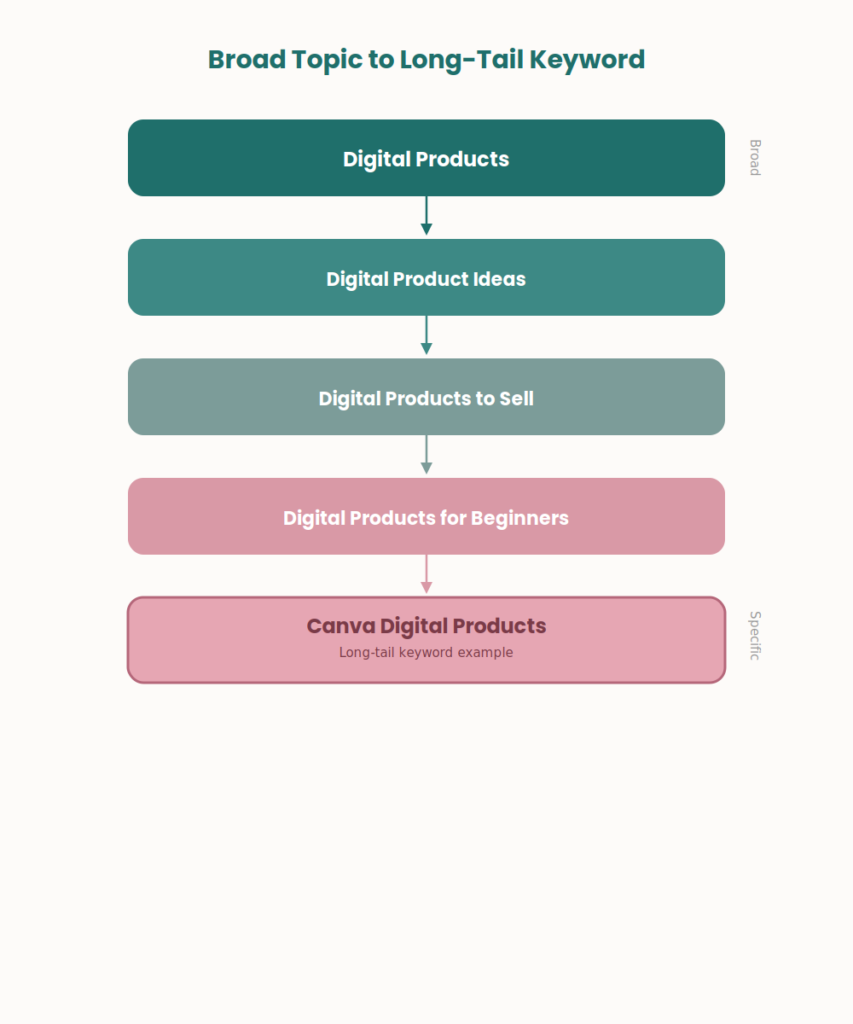
Long-tail keywords are longer, more specific phrases. They usually have a narrower search intent, which often makes them easier to rank for and more likely to attract a genuinely interested audience.
Examples from our digital products niche:
- digital product ideas for passive income
- digital products for beginners with no experience
- Canva digital products to sell on Etsy
These are examples of the kind of long-tail phrase to look for — not confirmed high-volume terms. Always verify relevance for your specific niche rather than copying examples directly.
Step 6: Look for Seasonal and Trending Topics
Pinterest is a highly seasonal platform, and users often search for seasonal content weeks or even months in advance. Planning around this can meaningfully extend your reach.
Common seasonal patterns include:
- Christmas and holiday gift guides
- wedding planning content
- back-to-school ideas
- summer recipes
- Valentine’s Day content
If you sell digital products, this might mean creating content around “digital gift ideas for the holidays” well before December, since Pinterest users typically start planning early. Avoid claiming exact search volumes unless you’ve verified them with a current, reliable tool — treat seasonal timing as a planning principle, not a guaranteed number.
Step 7: Build a Pinterest Keyword List
Once you’ve gathered ideas from the steps above, organize them into a simple list. Grouping keywords makes it much easier to plan boards, Pins, and content calendars.
A simple structure:
- Primary keyword: digital products
- Secondary keywords: digital product ideas, digital products to sell, digital products for beginners
- Long-tail keywords: digital product ideas for passive income, digital products for beginners with no experience
- Seasonal keywords: digital gift ideas for the holidays
- Related keywords: Canva digital products, digital products on Etsy, how to sell digital products
This list becomes your reference point when writing Pin titles, descriptions, and board names.
Where to Use Pinterest Keywords
Once you have your keyword list, the next question is where to actually use them. Keywords work best when they appear naturally across several parts of your Pinterest presence:
- Pinterest profile name and bio — a short, clear description of what you offer
- Pinterest boards — board titles built around specific topics
- Board descriptions — a few natural sentences describing what the board covers
- Pin titles — clear, keyword-rich, and readable
- Pin descriptions — a slightly longer explanation with supporting keywords
- Pin alt text — where relevant, to support accessibility and context
- Your article or landing page content — the page the Pin links to should match the keyword too
- Image or file names, where practical, for extra context
The goal is consistency. If your Pin, board, and linked content all reflect the same topic, Pinterest has a much clearer picture of what you’re offering — and who to show it to.
How Many Keywords Should You Use?
There’s no fixed keyword density that guarantees better Pinterest performance, and you should be skeptical of any advice that claims otherwise.
Instead of counting keywords, focus on:
- Relevance — does the keyword actually describe your content?
- Context — does it fit naturally into a sentence?
- Coverage — are you addressing the topic thoroughly, not just repeating one phrase?
- Intent match — does your content actually deliver what the keyword implies?
Keyword stuffing — repeating the same phrase unnaturally across your bio, board, and Pin description — tends to read poorly to real users and doesn’t offer any proven ranking benefit. Write for people first, and let the keywords support that writing rather than dominate it.
Best Tools for Pinterest Keyword Research
You don’t need an expensive toolkit to do solid Pinterest keyword research. Here are the most useful resources:
- Pinterest search and autocomplete — still the most direct source of real Pinterest search behavior
- Pinterest Trends — where available in your region, useful for spotting seasonal and rising topics
- Google Trends — helpful for understanding broader interest and seasonality patterns
- Google Search suggestions — can reveal related phrasing, even though it reflects Google search behavior rather than Pinterest’s
- Google Search Console — if you already have a website, this shows what search terms are driving traffic to your existing content
- SEO tools like Semrush or Ahrefs — useful for broader keyword research and competitive content analysis, though they’re built around Google search data rather than Pinterest’s own search engine
No external tool provides verified Pinterest search volume the way Google tools do for Google search. Pinterest’s own search bar and suggestions should remain your primary, most trustworthy source of Pinterest-specific keyword ideas.
Common Pinterest Keyword Research Mistakes
Even experienced marketers fall into these traps. Watching out for them can save you a lot of wasted effort:
- Choosing keywords based only on Google search volume, without checking whether people actually search for that phrase on Pinterest
- Keyword stuffing in bios, board descriptions, or Pin descriptions
- Targeting overly broad topics like “recipes” instead of more specific, intent-matched phrases
- Ignoring search intent and creating content that doesn’t match what the keyword implies
- Missing seasonal opportunities by publishing seasonal content too close to the actual date
- Chasing unrelated trending keywords just because they’re popular, even when they don’t fit your niche
- Copying competitor keywords without understanding why those keywords work for them
- Using the exact same keyword everywhere instead of natural variations
- Forgetting to optimize boards, and only focusing on individual Pins
- Creating content that doesn’t match the keyword it’s optimized for, which hurts both user trust and Pinterest’s understanding of your content
Pinterest Keyword Research for Different Types of Businesses
The core process stays the same, but how you apply it shifts depending on your business model.
Bloggers — Focus on the specific problems your posts solve. A food blogger might target “easy weeknight dinner ideas” rather than just “recipes.”
Digital Product Sellers — Target both the product type and the outcome it delivers, like “Canva templates for small business” or “digital planner for goal setting.”
Etsy Sellers — Combine product keywords with buyer-intent phrases, such as “personalized gift ideas” or “handmade wedding decor.”
Service Providers — Focus on the service and the result, like “Pinterest management for bloggers” or “social media scheduling for small business.”
Affiliate Marketers — Target comparison and decision-stage keywords, such as “best budgeting apps for beginners.”
Small Businesses — Blend local or niche-specific terms with broader category keywords, like “handmade candles for home decor.”
In every case, the goal is the same: match your keyword to the specific value you provide, not just the general category you’re in.
Pinterest Keyword Research Workflow
To keep this process repeatable, follow a simple workflow:
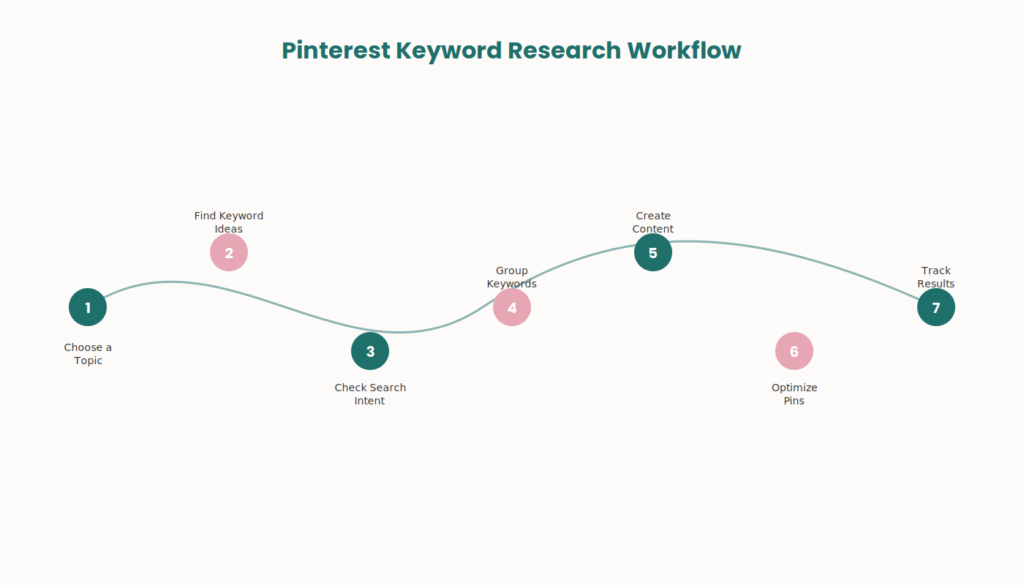
Topic → Pinterest search → keyword ideas → search intent → keyword grouping → content creation → pin optimization → performance tracking
Start broad, narrow down through Pinterest’s own search behavior, group your findings, create content around them, optimize your Pins, and then track what performs well so you can refine your approach over time. Pinterest SEO isn’t a one-time task — it’s a cycle you revisit regularly.
Frequently Asked Questions
What is Pinterest keyword research?
Pinterest keyword research is the process of finding the words and phrases people search for on Pinterest, so you can use them in your profile, boards, and Pins to improve visibility and reach the right audience.
How do I find keywords on Pinterest?
Use Pinterest’s own search bar and autocomplete suggestions, explore related search terms shown above results, and analyze what’s already ranking for your target topic.
What are the best tools for Pinterest keyword research?
Pinterest search and autocomplete are the most direct sources. Pinterest Trends, Google Trends, and general SEO tools like Semrush or Ahrefs can add extra context, though they don’t provide exact Pinterest search volume.
How many keywords should I use on Pinterest?
There’s no fixed number or density. Focus on relevance, natural language, and matching search intent instead of hitting a keyword count.
Where should I put keywords on Pinterest?
Use them naturally in your profile bio, board titles, board descriptions, Pin titles, Pin descriptions, and alt text, as well as on the page your Pin links to.
Is Pinterest keyword research the same as Google keyword research?
Not exactly. Both involve finding search terms, but Pinterest users tend to search with broader, more exploratory intent, and seasonality plays a bigger role in Pinterest search behavior.
How do I find long-tail Pinterest keywords? Look at Pinterest’s related search suggestions and autocomplete for more specific phrase variations, and pay attention to the language used in high-performing Pins within your niche.
Does Pinterest keyword research help with Pinterest SEO?
Yes. Keyword research is the foundation of Pinterest SEO — it directly informs how you optimize your profile, boards, and Pins so Pinterest can understand and recommend your content.
Key Takeaways
- Pinterest keyword research helps Pinterest understand your content and match it to the right searches.
- Pinterest search behavior is broader and more visual than Google search, and seasonality plays a much bigger role.
- A step-by-step process — starting broad, using Pinterest’s own suggestions, and building a grouped keyword list — works for almost any niche.
- Keywords should be used naturally across your profile, boards, and Pins, without stuffing or repetition.
- No single tool provides exact Pinterest search volume, so Pinterest’s own search and suggestions remain your best source of truth.
Conclusion
Successful Pinterest SEO comes down to a simple idea: understand what people are actually searching for, and create content that genuinely matches it. Pinterest keyword research gives you that understanding. From there, it’s about applying those keywords naturally across your profile, boards, and Pins, and consistently reviewing what’s working so you can refine your strategy over time.
If you’d rather have an experienced Pinterest strategist handle your keyword research, board setup, and Pin optimization for you, PinDesignCo’s Pinterest SEO Services and Pinterest Management Services are built to help bloggers, small businesses, and digital product sellers grow their visibility on Pinterest without guesswork.
Pingback: Pinterest Content Strategy: Complete 2026 Guide
Pingback: How to Boost a Pinterest Business Account: 10 Practical Tips