
Table of Contents
If you’ve spent any time on Etsy lately, you’ve probably noticed how many shops are quietly making a living off Canva templates — Instagram post packs, wedding invitations, resume designs, planner pages. None of it requires a design degree. None of it requires inventory. And the barrier to entry is lower than almost any other online business you could start this year.
That doesn’t mean it’s easy money. Etsy’s template category has gotten more competitive, and the sellers who are actually making consistent income in 2026 are the ones treating it like a real business, not a weekend experiment. This guide walks you through exactly how to do that — from understanding Canva’s licensing rules to pricing your templates, optimizing your listings, and avoiding the mistakes that quietly kill most shops before they get traction.
Why Canva Templates Work So Well as a Digital Product
Canva templates sit in a sweet spot that most digital products don’t reach. There’s no cost of goods, no shipping, no inventory to manage, and once a template is built, it can sell indefinitely with zero extra work. Profit margins routinely land in the 80–95% range after Etsy’s fees, which is difficult to match with almost any other product type.
The demand side is just as strong. Canva now has well over 190 million monthly active users worldwide, and a large share of them are small business owners, coaches, content creators, and real estate agents who want a professional-looking design without learning Canva from scratch. Etsy, with tens of millions of active buyers actively searching for “editable” and “instant download” templates, is one of the few marketplaces where that specific intent — someone actively looking to buy — is baked into the platform itself.
The opportunity is real. But it’s also crowded, which is exactly why the next section matters more than most guides give it credit for.
Is It Legal to Sell Canva Templates? Understanding the Licensing Rules
This is where a lot of new sellers get tripped up, so it’s worth being precise about it.
You are allowed to sell templates you design using Canva, including ones that use Canva’s free and Pro design elements — but only if you combine those elements into an original composition. What you cannot do is resell a Canva element on its own, or take an existing Canva template and republish it with only minor tweaks. The design has to be meaningfully yours.
A practical rule of thumb: if someone could recreate what you’re selling by searching Canva’s element library for five minutes and dragging the same pieces into the same layout, it’s too close to the original. Real customization — your own layout, your own typography choices, your own color system, your own copy — is what makes it a legitimate product.
One more detail that trips people up: stick to free Canva elements wherever possible. If your template relies heavily on Pro-only elements, buyers without a Canva Pro subscription will hit a paywall or a watermark when they try to use it. That’s one of the fastest ways to generate refund requests and one-star reviews.
Step-by-Step: How to Sell Canva Templates on Etsy
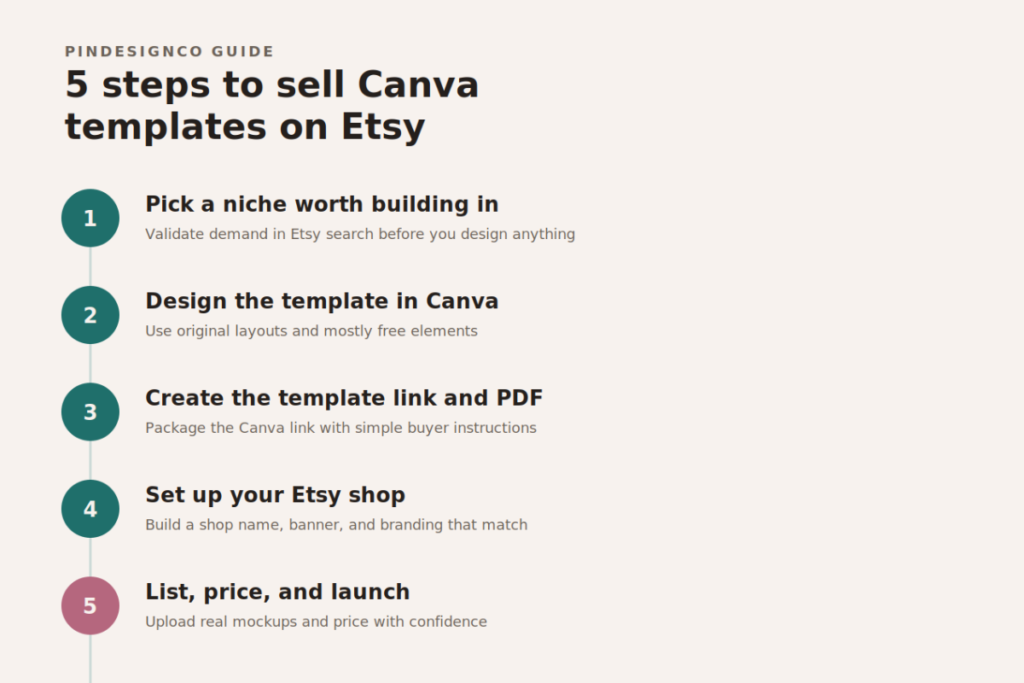
Step 1: Pick a Niche Worth Building In
The biggest mistake new sellers make isn’t a design mistake — it’s a research mistake. They open Canva and start designing before checking whether anyone is actually searching for what they’re about to build.
Before you design anything, search your candidate niche directly in Etsy’s search bar and see what comes up. As a general guideline, a niche with roughly 200–3,000 existing listings usually signals healthy demand without impossible saturation. Fewer than that, and the audience may not exist yet. Tens of thousands of listings, and you’re competing against shops with years of reviews behind them.
Specificity wins. “Instagram templates” is nearly impossible to break into. “Client intake forms for massage therapists” or “Airbnb welcome book templates for beach rentals” gives you a defensible corner of the market — the kind competitors won’t stumble onto for months.
Step 2: Design the Template
Build your template inside Canva using original layouts and, where possible, free elements. Keep a consistent visual system across everything in a collection — same fonts, same color logic, same spacing rhythm — so your shop reads as a cohesive brand rather than a pile of unrelated files. Buyers browsing template shops are, whether they realize it or not, evaluating your taste as much as your product.
Step 3: Create the Template Link and Delivery File
You never send buyers the raw design file. Instead, you generate a Template Link in Canva (Share → Template Link → Copy Link), which gives each buyer their own editable copy without touching your original.
Package that link inside a simple PDF along with clear instructions: how to open the link, how to make their own copy, and how to edit the text and images without breaking the layout. Assume your buyer has never used Canva before — many haven’t. A confused first-time buyer is far more likely to leave a bad review than ask a question.
Step 4: Set Up Your Etsy Shop
Setting up the shop itself is the fastest part of this process. Choose a shop name that signals what you sell rather than something abstract — a name like “PlannerStudioCo” tells a buyer more in two seconds than a clever but unrelated brand name ever will. Build out a shop banner, logo, and tagline that match your visual identity, and make sure your “About” section briefly explains who your templates are for.
Step 5: List, Price, and Launch
When creating your listing, select Digital Files as the product type, upload your instruction PDF, and add preview images that show real pages of the template — not just a cover graphic. Buyers want to see what they’re actually getting before they commit.
What It Actually Costs to Sell on Etsy
Etsy’s fees are straightforward once you see them laid out, but they add up faster than most new sellers expect.
| Fee Type | Typical Cost |
|---|---|
| One-time shop setup fee | ~$15 (varies by region) |
| Listing fee (per item, every 4 months) | $0.20 |
| Transaction fee | 6.5% of sale price |
| Payment processing fee | ~3% + $0.25 per transaction |
| Offsite ads fee (if applicable) | 12–15% on sales attributed to those ads |
A simple way to think about your net profit: Price − (listing fee + transaction fee + processing fee). On a $10 template, you’re realistically keeping somewhere around $8–8.50 after fees — still a strong margin for a product with zero production cost, but worth factoring into how you price.
On pricing itself: resist the urge to underprice to “get the first sale.” Single templates in the $9–15 range and bundles in the $29–39 range tend to perform better long-term than $3 listings, both because they signal quality and because they leave room to raise prices later without disrupting your review history.
Etsy SEO: How to Actually Get Found
Etsy is a search engine before it’s a marketplace, and template listings live or die on how well they’re optimized for it.
Titles: Lead with your most important keyword in the first 40–55 characters, since that’s what shows in search results. “Editable Instagram Templates” is vague. “30 Editable Instagram Post Templates for Coaches, Canva Template Bundle” tells both Etsy’s algorithm and the buyer exactly what they’re getting.
Tags: Use all 13 available tags on every listing. Mix broad terms (“canva template”) with specific long-tail phrases (“client onboarding template canva”) to capture both high-traffic searches and hyper-relevant ones.
Descriptions: Open with the benefit, not the feature list — something like “Save hours of design time with a plug-and-play template built for real estate agents” — then follow with the concrete details: number of pages, dimensions, whether Canva Pro is required, and what’s included in the download.
Photos: Show your templates inside realistic mockups (a laptop screen, a printed page, a phone) rather than flat screenshots. Listings with styled mockups consistently convert better than ones that just show the raw design.
Common Mistakes That Quietly Kill New Shops
A few patterns show up again and again in shops that stall out:
- Designing before researching demand. Beautiful templates for a niche nobody is searching for won’t sell, no matter how good they look.
- Relying on Canva Pro elements. This creates paywalls for free-tier buyers and generates avoidable refund requests.
- Underpricing from the start. Cheap pricing anchors your reviews and makes it harder to raise prices later.
- Vague titles and incomplete tags. Etsy can’t rank what it can’t understand.
- No instructions for first-time buyers. Many people buying their first template have never used Canva. Assume nothing.
- Treating it as a one-and-done listing. Shops that grow steadily list consistently and refine based on what’s already selling, rather than stopping after the first few products.
Frequently Asked Questions
Do I need Canva Pro to sell templates on Etsy?
No, a free Canva account is enough to generate Template Links and sell your designs. A Pro subscription (roughly $13/month) unlocks premium elements, background removal, and one-click resizing, which can speed up your workflow, but it isn’t required to get started.
Can buyers use my templates without a paid Canva account?
Yes. A free Canva account is sufficient for buyers to open your Template Link and edit their own copy. This is exactly why sticking to free design elements matters — it keeps the experience smooth for buyers on the free tier.
How much can you realistically earn selling Canva templates on Etsy?
It varies widely. Most new shops earn modestly in the first several months while building reviews and visibility, with more established, niche-focused shops earning several hundred to a few thousand dollars a month over time. Consistency and niche selection matter far more than luck.
Is selling Canva templates on Etsy still worth it in 2026?
Yes, though the strategy has shifted. Generic, broad templates are harder to sell profitably now. Sellers who succeed are the ones targeting specific buyer problems and niches rather than competing head-on in oversaturated categories like generic “Instagram templates.”
How Pinterest Drives Traffic to Your Etsy Template Shop
Etsy SEO gets your templates found by people already searching inside Etsy. Pinterest does something different — it puts your templates in front of buyers before they’ve started searching, while they’re still planning a project, building a brand, or looking for inspiration.
This matters because Pinterest functions less like a social feed and more like a visual search engine. A single well-designed pin linking to your Etsy listing can keep sending traffic for months, sometimes years, long after the pin was created. That’s a very different economics than a one-off social post that disappears in a day.
The approach is simple: create individual pins for each template collection, use keyword-rich pin titles and descriptions (the same way you’d optimize an Etsy title), and link each pin directly to the matching Etsy listing. Over time, this builds a second, compounding traffic source that runs independently of Etsy’s internal search — which also protects your shop from being entirely dependent on one platform’s algorithm.
If you’re not yet using Pinterest strategically for your shop, this is usually the highest-leverage next step. Explore PinDesignCo’s Pinterest Marketing services to see how a consistent pin strategy can be built around your existing template collection.
Ready to Build Your Template Shop?
Selling Canva templates on Etsy isn’t a shortcut to passive income — but it is one of the most accessible digital product businesses you can start with genuinely low risk. Pick a specific niche, design with intention, price with confidence, and treat your listings as an ongoing SEO project rather than a one-time task.
If you want a done-for-you starting point, explore PinDesignCo’s Canva template collections, built specifically for creators who want a professional foundation without starting from a blank canvas.
Pingback: Pinterest SEO Services | Expert Pinterest Optimization
Pingback: 25 Best Side Hustles for Women to Make Extra Money