
If you’ve created a digital product — a Canva template, a printable planner, a course, a font, an ebook — the hardest decision usually isn’t making it. It’s figuring out where to sell it.
Search “best place to sell digital products” and you’ll get a dozen listicles that just copy-paste the same eight platforms with the same three bullet points each. None of them tell you which marketplace actually fits your specific product, your audience size, or your long-term goals.
That’s the gap this guide fills. We’re going to walk through the marketplaces that actually matter in 2026 — not just what they are, but who they’re really built for, what they cost once you factor in transaction fees, and where they fall short. By the end, you’ll know exactly which platform (or combination of platforms) makes sense for your business, whether you’re just getting started or scaling a full digital product catalog.
This is written from the perspective of someone building a real, sustainable digital product business — not chasing a quick payday. If you’re serious about turning Canva templates, printables, or Pinterest-driven digital products into recurring income, the platform you choose now will shape how much of your revenue you actually keep, and how much control you have over your brand later.
What Is a Digital Product Marketplace?
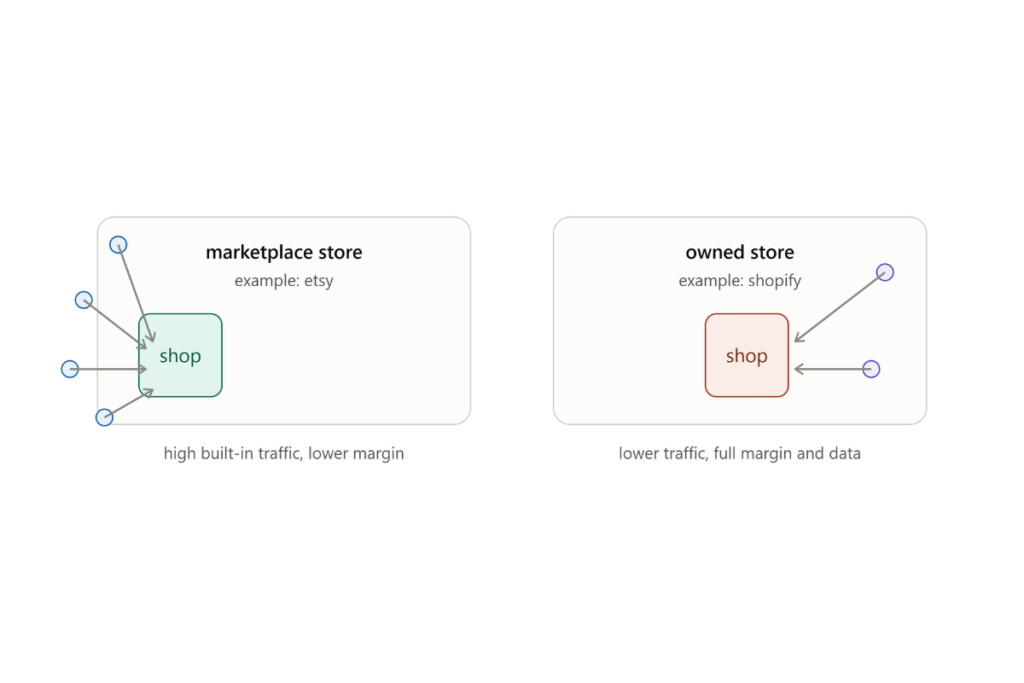
A digital product marketplace is a platform where creators list downloadable or digital goods — templates, printables, courses, software, presets, ebooks — for customers to purchase and download instantly. Some marketplaces (like Etsy or Creative Market) bring you built-in shoppers actively searching for products. Others (like Gumroad, Payhip, or Shopify) are more like storefront tools: you bring your own traffic, and the platform handles checkout, delivery, and payment processing.
The distinction matters enormously. A marketplace with built-in traffic can get your first sale within days of listing a product. A storefront tool with no built-in audience might get you zero sales until you’ve built a following on Pinterest, Instagram, or through SEO — but once you have that traffic, you’ll usually keep a much larger share of each sale.
Why Choosing the Right Marketplace Actually Matters
Most creators pick a marketplace based on whichever one they saw mentioned in a YouTube video. That’s a mistake, because the “right” platform depends on three things:
- Where your buyers already are. Etsy shoppers behave differently than Instagram followers or email subscribers.
- How much control you want over pricing, branding, and customer data. Marketplaces like Etsy own the customer relationship. Your own Shopify store lets you own it.
- How the fee structure affects your margins at scale. A 6.5% Etsy fee feels small on one $8 sale. It adds up very differently once you’re selling 500 units a month.
Picking the wrong platform early on doesn’t just cost you money — it costs you time rebuilding a storefront, migrating customers, and re-learning a new system a year later. Let’s go through the platforms that actually deserve your attention.
Etsy
Overview: Etsy is the largest built-in marketplace for handmade, vintage, and digital creative goods, with millions of active shoppers searching daily for printables, templates, and planners.
Best for: Printables, planners, SVG files, wedding templates, and Canva templates aimed at consumers actively searching to buy.
Pros:
- Massive built-in search traffic — no need to drive your own audience to get sales
- Strong intent-based buyers who are ready to purchase, not just browsing
- Instant digital delivery, so no manual fulfillment
- Works exceptionally well alongside Pinterest marketing, since both platforms are visually and search-driven
Cons:
- Etsy owns the customer relationship — you don’t get direct access to buyer emails
- Fees include listing fees, transaction fees, and payment processing, which stack up
- Increasingly saturated in popular niches like planners and wedding invites
- Limited branding control compared to your own store
Pricing: $0.20 per listing (renews every 4 months or on sale), 6.5% transaction fee, plus payment processing fees (around 3% + $0.25 in the US).
Traffic Potential: Very high — Etsy is a search engine in its own right, and ranks well on Google too.
Ease of Use: High. Listing a digital product takes minutes.
Digital Products Supported: Printables, Canva templates, planners, SVGs, fonts, clip art, digital art.
Who Should Use It: Beginners who want fast visibility without building an audience first, and anyone selling visually-driven, search-friendly products like planners or templates.
Gumroad
Overview: Gumroad is a simple, creator-friendly storefront for selling digital downloads, memberships, and courses directly to your own audience.
Best for: Creators with an existing audience (Pinterest, email list, social following) who want a low-friction checkout page.
Pros:
- Extremely fast setup — you can list a product in minutes
- No monthly fee on the free plan (percentage-based fee instead)
- Clean, distraction-free checkout that converts well
- Good for one-off digital products, bundles, and pay-what-you-want pricing
Cons:
- No built-in marketplace traffic — you must bring your own buyers
- Fee percentage is higher than some competitors on the free tier
- Limited customization for building a full branded storefront
Pricing: Free to start, 10% + payment processing on the free plan; lower fees (around 3.5%) on paid tiers.
Traffic Potential: Low on its own — depends entirely on your outside marketing (Pinterest, email, social).
Ease of Use: Very high — one of the simplest checkout tools available.
Digital Products Supported: Ebooks, templates, presets, courses, software, memberships.
Who Should Use It: Creators who already have traffic sources (like a Pinterest strategy) and want a fast, no-fuss checkout without building a full website.
Payhip
Overview: Payhip is a lightweight digital storefront built specifically for creators selling downloads, memberships, and online courses, with built-in affiliate and coupon tools.
Best for: Creators who want more storefront customization than Gumroad, plus native affiliate marketing features.
Pros:
- No monthly fee, and you keep more of each sale on the free plan than some alternatives
- Built-in affiliate program tools to recruit promoters
- EU VAT handling built in, useful for international sellers
- Supports digital downloads, courses, memberships, and physical products
Cons:
- Smaller brand recognition than Etsy or Shopify
- Less design flexibility than a full website builder
- No built-in marketplace traffic
Pricing: Free plan takes 5% per sale; paid plans ($29–$99/month) reduce the fee to 2% or 0%.
Traffic Potential: Low without external marketing, but the affiliate tools can help generate referral traffic.
Ease of Use: High, with a slightly steeper learning curve than Gumroad for setup.
Digital Products Supported: Ebooks, templates, courses, memberships, software licenses.
Who Should Use It: Creators who want to build an affiliate network around their digital products, or who want more storefront branding than Gumroad offers.
Creative Market
Overview: Creative Market is a curated marketplace for design assets — fonts, graphics, templates, mockups, and Canva templates — aimed at designers, marketers, and small business owners.
Best for: Designers selling fonts, graphic templates, mockups, and Canva-compatible design assets.
Pros:
- Built-in audience of design-savvy buyers actively looking for assets
- Strong reputation and trust among design professionals
- Good discoverability through curated collections and search
Cons:
- Application and approval process for some product categories
- Revenue share is lower than running your own store (typically 40–70% depending on category and tier)
- More competitive and design-quality expectations are high
Pricing: No listing fee, but revenue share ranges from roughly 40% to 70% depending on seller tier and product type.
Traffic Potential: High among a design-focused audience, though smaller overall volume than Etsy.
Ease of Use: Moderate — asset quality standards are stricter.
Digital Products Supported: Fonts, graphic templates, Canva templates, mockups, presets, icon sets.
Who Should Use It: Designers with polished, professional-grade assets who want visibility among other design buyers rather than general consumers.
Shopify
Overview: Shopify is a full e-commerce platform that, with digital product apps, becomes a fully brandable storefront you own outright.
Best for: Established creators or brands ready to build a long-term, fully branded digital product business.
Pros:
- Complete control over branding, design, and customer experience
- You own the customer data and email list — critical for long-term marketing
- Scales well as you add more products, bundles, and even physical merch later
- Huge app ecosystem for upsells, subscriptions, and email marketing integration
Cons:
- Monthly subscription cost regardless of sales volume
- Requires digital download apps (like SendOwl or Digital Downloads) for file delivery
- No built-in marketplace traffic — 100% depends on your own marketing
Pricing: Plans start around $29–$39/month, plus app costs and payment processing (around 2.9% + $0.30).
Traffic Potential: None built-in — entirely dependent on your Pinterest, SEO, and social strategy.
Ease of Use: Moderate — more setup than Gumroad or Payhip, but far more powerful long-term.
Digital Products Supported: Templates, courses, memberships, software, and hybrid physical/digital catalogs.
Who Should Use It: Brands like PinDesignCo that want full ownership of their storefront, customer list, and brand experience — ideal once you have consistent traffic from Pinterest or SEO.
Sellfy
Overview: Sellfy is an all-in-one storefront for digital products, print-on-demand, and subscriptions, with a simpler setup than Shopify.
Best for: Creators who want an embeddable store plus built-in email marketing tools.
Pros:
- Built-in marketing tools (email campaigns, upsells, discount codes)
- Can embed the store directly into an existing website
- Supports both digital downloads and print-on-demand products
Cons:
- Smaller ecosystem and community than Shopify
- Monthly fee required even at low sales volume
- Less flexibility for advanced customization
Pricing: Plans start around $19/month (billed annually), scaling with revenue limits.
Traffic Potential: None built-in.
Ease of Use: High — simpler than Shopify for creators who don’t need heavy customization.
Digital Products Supported: Templates, ebooks, presets, music, print-on-demand items.
Who Should Use It: Creators who want built-in email marketing without managing a separate email platform.
Lemon Squeezy
Overview: Lemon Squeezy is a modern checkout and storefront platform built with a strong focus on handling global tax compliance (merchant of record) for digital products and SaaS.
Best for: Creators and small software/digital product businesses selling internationally who want tax headaches handled automatically.
Pros:
- Acts as merchant of record, meaning it handles international VAT/sales tax for you
- Clean, modern checkout experience
- Good for subscriptions, licenses, and one-time digital products alike
Cons:
- Newer platform with a smaller community than Gumroad or Shopify
- No built-in marketplace traffic
- Fee structure can be higher than a straight payment processor
Pricing: 5% + $0.50 per transaction, no monthly fee.
Traffic Potential: None built-in.
Ease of Use: High, especially for creators intimidated by international tax rules.
Digital Products Supported: Templates, software licenses, subscriptions, digital downloads.
Who Should Use It: Sellers with an international audience who want tax compliance handled without hiring an accountant.
Fourthwall
Overview: Fourthwall combines a digital storefront with merchandise and membership tools, popular among creators building a personal brand.
Best for: Creators who want to pair digital products with branded merchandise and fan memberships.
Pros:
- Combines digital downloads with print-on-demand merch in one store
- Built-in membership and Discord integration options
- No upfront cost — free to set up
Cons:
- Best suited to creators with an existing following (YouTube, TikTok, etc.)
- Less focused purely on digital products compared to Gumroad or Payhip
Pricing: Free to start; takes a percentage of sales (varies by product type).
Traffic Potential: None built-in — relies on the creator’s existing audience.
Ease of Use: High.
Digital Products Supported: Digital downloads, memberships, bundled with merchandise.
Who Should Use It: Creators who already have a personal brand and want to combine digital and physical offers in one place.
Stan Store
Overview: Stan Store is a link-in-bio style storefront designed for creators selling digital products, coaching calls, and templates directly from social media.
Best for: Instagram, TikTok, and Pinterest creators who want a simple, mobile-first storefront linked from their bio.
Pros:
- Extremely fast setup, optimized for mobile buyers coming from social media
- Great for selling templates, mini-courses, and coaching bundles
- Simple checkout with minimal steps, which helps conversion from social traffic
Cons:
- Monthly subscription required
- Less suited for larger catalogs or complex product lines
- Limited SEO value since it’s not built for organic search
Pricing: Plans typically start around $29/month.
Traffic Potential: None built-in — designed to convert your existing social audience.
Ease of Use: Very high.
Digital Products Supported: Templates, mini-courses, digital guides, coaching sessions.
Who Should Use It: Social-first creators who send traffic from Instagram or TikTok bios and want the simplest possible mobile checkout.
Ko-fi
Overview: Ko-fi started as a tipping platform for creators and has expanded into digital product sales, memberships, and commissions.
Best for: Illustrators, writers, and creators with a supportive community who want a low-pressure way to sell extras alongside donations.
Pros:
- No platform fee on digital product sales (Ko-fi Gold unlocks more features for a small monthly fee)
- Friendly, community-first feel that suits illustrators and indie creators
- Combines tips, memberships, and shop in one profile
Cons:
- Smaller built-in audience compared to Etsy or Creative Market
- Less “professional storefront” feel — better suited to community-driven brands
- Not ideal for scaling a serious product catalog
Pricing: Free tier available; Ko-fi Gold is about $6/month for extra features, with 0% platform fee on shop sales either way.
Traffic Potential: Low — mostly relies on existing fans and community.
Ease of Use: Very high.
Digital Products Supported: Digital art, templates, ebooks, commissions, memberships.
Who Should Use It: Creators with a community-based following who want a friendly, low-fee way to sell alongside tips and memberships.
Design Bundles
Overview: Design Bundles is a marketplace specifically for craft-focused digital assets like SVGs, fonts, and Cricut-compatible designs.
Best for: Crafters selling SVG cut files, fonts, and templates for Cricut and Silhouette users.
Pros:
- Built-in audience specifically shopping for craft and cut-file products
- Frequent bundle promotions drive consistent traffic
- Simple upload and listing process
Cons:
- Niche audience — not ideal outside the crafting space
- Revenue share model means you keep less than a self-hosted store
- Heavy competition within popular categories like SVG bundles
Pricing: Free to list; revenue share typically around 70/30 in the seller’s favor, varying by promotion type.
Traffic Potential: Moderate-to-high within the crafting niche.
Ease of Use: High.
Digital Products Supported: SVGs, fonts, Cricut/Silhouette files, craft templates.
Who Should Use It: Sellers specifically targeting the crafting and cut-file audience.
Creative Fabrica
Overview: Similar to Design Bundles, Creative Fabrica is a marketplace for fonts, SVGs, and craft assets with a subscription-based buyer model.
Best for: Font and SVG creators wanting recurring exposure through a subscription marketplace.
Pros:
- Subscription model means buyers keep coming back monthly, increasing repeat exposure
- Large existing library and buyer base in the crafting/font space
- Good discoverability through search and categories
Cons:
- Revenue per download can be lower due to the subscription model diluting per-sale pricing
- Niche-specific — less useful outside fonts, SVGs, and craft assets
Pricing: Free to list; earnings based on download share within the subscription pool.
Traffic Potential: Moderate-to-high within its niche.
Ease of Use: High.
Digital Products Supported: Fonts, SVGs, craft templates, embroidery designs.
Who Should Use It: Font and SVG designers wanting consistent exposure to a recurring subscriber base.
WooCommerce
Overview: WooCommerce is a free WordPress plugin that turns any WordPress site into a fully customizable online store.
Best for: Creators who already have a WordPress website (like a blog) and want full ownership without a Shopify-style monthly fee.
Pros:
- No mandatory monthly platform fee — only hosting and optional extensions
- Complete design and functionality control since it’s built on WordPress
- Excellent for combining a content-driven blog with a digital product store in one place
Cons:
- Requires more technical setup and maintenance than hosted platforms
- You’re responsible for security, updates, and backups
- Steeper learning curve for non-technical sellers
Pricing: Free plugin; costs come from hosting (~$5–$30/month) and optional premium extensions.
Traffic Potential: None built-in — depends entirely on your SEO and content strategy.
Ease of Use: Lower than hosted platforms — best for those comfortable with WordPress.
Digital Products Supported: Templates, ebooks, courses, memberships, software.
Who Should Use It: Bloggers and content-driven brands who already publish SEO content and want their store built directly into that ecosystem.
Podia
Overview: Podia is an all-in-one platform for selling courses, digital downloads, and memberships with built-in email marketing.
Best for: Creators focused on online courses and memberships alongside digital downloads.
Pros:
- Combines courses, downloads, memberships, and email marketing in one subscription
- No transaction fees on paid plans
- Clean, creator-friendly interface
Cons:
- Monthly fee required, which can feel like overkill if you’re only selling simple downloads
- No built-in marketplace traffic
Pricing: Plans start around $33/month (billed annually), with higher tiers unlocking more features.
Traffic Potential: None built-in.
Ease of Use: High.
Digital Products Supported: Online courses, digital downloads, memberships, coaching.
Who Should Use It: Creators planning to combine digital downloads with a course or membership offer under one roof.
Comparison Table
| Marketplace | Best For | Pricing | Built-in Audience | Ease of Use | Overall Rating |
|---|---|---|---|---|---|
| Etsy | Printables, planners, templates | $0.20/listing + 6.5% fee | Very High | High | 9/10 |
| Gumroad | Creators with existing traffic | Free–10% or 3.5% (paid) | None | Very High | 8.5/10 |
| Payhip | Affiliate-driven digital sales | Free–5%, or flat monthly | None | High | 8/10 |
| Creative Market | Fonts, design assets, mockups | 40–70% revenue share | High (design niche) | Moderate | 8/10 |
| Shopify | Full branded storefront | ~$29–$39/mo + fees | None | Moderate | 9/10 |
| Sellfy | Built-in email marketing | ~$19/mo+ | None | High | 7.5/10 |
| Lemon Squeezy | International tax compliance | 5% + $0.50/txn | None | High | 8/10 |
| Fourthwall | Digital + merch combo | Free + % fee | None | High | 7/10 |
| Stan Store | Social media-first sellers | ~$29/mo | None | Very High | 7.5/10 |
| Ko-fi | Community-driven creators | Free–$6/mo | Low | Very High | 7/10 |
| Design Bundles | SVG/craft file sellers | Revenue share | Moderate–High (niche) | High | 7.5/10 |
| Creative Fabrica | Fonts/SVGs, subscription model | Revenue share | Moderate–High (niche) | High | 7.5/10 |
| WooCommerce | WordPress-based full ownership | Free plugin + hosting | None | Lower | 8.5/10 |
| Podia | Courses + downloads + memberships | ~$33/mo+ | None | High | 8/10 |
Common Mistakes Beginners Make
Choosing a marketplace based on hype, not fit. A platform that worked for someone else’s course business won’t necessarily work for your printable shop.
Ignoring the true cost of fees at scale. A 20% combined fee feels manageable at 10 sales a month. At 1,000 sales, that’s a serious chunk of revenue you’re giving away permanently.
Listing on a marketplace with zero traffic strategy. Platforms like Gumroad, Shopify, and Podia don’t bring buyers to you. Without a Pinterest or SEO strategy feeding traffic in, even the best storefront sits empty.
Never testing more than one platform. Many creators pick one marketplace and stay there out of habit, even after it stops delivering results.
Underpricing to “compete” on a crowded marketplace. Racing to the bottom on price erodes your margins and trains buyers to expect discounts, which hurts long-term brand positioning.
How to Choose the Right Marketplace
Ask yourself these four questions before committing:
- Do I already have traffic, or do I need the marketplace to bring me traffic? If you’re starting from zero audience, Etsy or Creative Market’s built-in search traffic will get you moving faster than a bare Shopify store.
- How important is owning my customer data? If email marketing and retargeting matter to your long-term strategy, a self-hosted store (Shopify, WooCommerce) is worth the extra setup.
- What type of product am I selling? Craft-specific products (SVGs, fonts) do better on niche marketplaces like Design Bundles. Broad templates and printables do well on Etsy. Courses and memberships fit Podia or Shopify better.
- What’s my growth timeline? If you’re testing an idea, start with the lowest-friction option (Gumroad or Etsy). If you’re building a long-term brand like PinDesignCo, plan your infrastructure around a store you fully own.
Should You Sell on Multiple Marketplaces?
Yes — for most digital product creators, a multi-platform approach outperforms relying on a single channel. A common, effective structure looks like this:
- Etsy for discovery and cold traffic from active shoppers
- Your own Shopify or WooCommerce store for full-margin sales driven by your Pinterest and email traffic
- A niche marketplace (like Creative Market or Design Bundles) if your product fits that specific audience
The key is not spreading yourself too thin. Start with one traffic-generating platform and one owned platform, then expand only once each is generating consistent, trackable sales.
Marketplace vs. Your Own Website
A marketplace gets you sales faster because it brings the traffic. Your own website (Shopify, WooCommerce) gets you higher margins and full ownership of the customer relationship, but only pays off once you have a traffic source — which is exactly where a strong Pinterest and SEO strategy becomes essential.
The realistic long-term path most successful digital product sellers follow: start on a marketplace like Etsy to validate demand and generate early revenue, then build a Pinterest-driven audience and gradually shift higher-margin sales to your own store, while keeping Etsy as a discovery channel.
Marketplace Fees Explained
Fees usually stack in three layers:
- Listing fees — a flat cost to list a product (Etsy charges this; most others don’t).
- Transaction/platform fees — a percentage the platform takes from each sale.
- Payment processing fees — charged by the payment processor (Stripe, PayPal) regardless of platform, typically 2.9–3.5% plus a small flat fee.
When comparing platforms, always calculate your effective take-home rate on a realistic sale price, not just the headline fee percentage. A platform with a 5% fee but a mandatory $39/month subscription can cost you more at low sales volume than a 10% fee with no monthly cost.
Tips to Increase Digital Product Sales
- Use Pinterest strategically, since it functions as a visual search engine that sends long-term, evergreen traffic to product listings — far longer-lasting than a single Instagram post.
- Bundle related products to increase average order value without needing more traffic.
- Write SEO-optimized product titles and descriptions, mirroring how buyers actually search rather than how you’d describe the product internally.
- Use clear, styled mockups for every listing — buyers can’t touch a digital product, so the visual presentation carries the trust.
- Collect emails wherever possible, even on marketplaces that don’t give you buyer data directly, through a lead magnet linked in your listing.
Future Trends in Digital Product Marketplaces
Expect continued growth in merchant-of-record platforms (like Lemon Squeezy) as global tax compliance becomes more complex for solo creators. Niche-specific marketplaces will keep growing too, as broad platforms become more saturated and buyers search for specialized, curated selection. Finally, Pinterest-driven traffic to owned storefronts will remain one of the most cost-effective long-term acquisition channels, since Pinterest content continues driving traffic for months or years after publishing — unlike short-lived social posts.
FAQ
1. What is the best marketplace for beginners selling digital products?
Etsy is generally the best starting point for beginners because of its built-in search traffic, which can generate sales before you’ve built an audience elsewhere.
2. Which platform has the lowest fees for digital products?
It depends on volume. Ko-fi and Payhip’s free tiers have low or no percentage fees, but platforms with monthly subscriptions (like Podia) can be cheaper at higher sales volumes.
Can I sell the same digital product on multiple marketplaces?
Yes, as long as the marketplace’s terms of service allow it, which most do. Many sellers list the same product on Etsy and their own store simultaneously.
Is Etsy still worth it for digital products in 2026?
Yes, particularly for printables, planners, and templates, since Etsy’s search traffic remains strong for visually-driven, intent-based products.
Should I use Shopify or Etsy first?
Start with Etsy if you have no existing traffic. Move toward Shopify once you have a consistent traffic source, like a Pinterest strategy, feeding your own store.
What’s the difference between Gumroad and Payhip?
Gumroad is simpler and faster to set up; Payhip offers more storefront customization and built-in affiliate tools.
Do I need a website to sell digital products?
No — marketplaces like Etsy, Gumroad, and Ko-fi don’t require your own website. A website becomes valuable once you want full branding control and to own your customer data.
How do I avoid high marketplace fees?
Combine a marketplace for discovery with your own store for direct sales once you have traffic, so you’re not solely reliant on high-fee platforms for every sale.
What’s the best marketplace for selling Canva templates?
Etsy and Creative Market are both strong choices — Etsy for broader consumer reach, Creative Market for design-focused buyers.
Is it better to sell courses on Podia or Shopify?
Podia is simpler and built specifically for courses and memberships. Shopify offers more flexibility if you’re also selling physical products or want deeper customization.
Conclusion
There’s no single “best” marketplace for every digital product creator — there’s only the best marketplace for where you are right now.
If you’re just starting and have no audience yet, Etsy gives you the fastest path to your first sales. If you already have traffic from Pinterest, email, or social media, Gumroad or Payhip offer a low-friction way to convert that traffic without the overhead of a full website. If you’re building a long-term, branded business — which is the direction we always recommend for creators serious about digital products — Shopify or WooCommerce gives you full ownership of your customer relationships and the highest long-term margins.
Design-focused sellers should look closely at Creative Market, while craft and SVG sellers will find a more targeted audience on Design Bundles or Creative Fabrica. Course creators combining downloads with memberships should consider Podia.
The smartest long-term strategy isn’t picking one platform and hoping — it’s using a marketplace for discovery while building your own store for ownership, and feeding both with consistent Pinterest and SEO-driven traffic.
Want to go deeper? Explore our related guides on How to Create Digital Products and How to Sell Canva Templates to build your next step with a clear, strategic plan.